
Create your Ellibo account
Sign up once and use every Ellibo app with the same email and password. Every new business gets a 14-day free trial, with no card needed.
One Ellibo account opens POS, Accounting, Inventory, CRM and Subscriptions. You don't need a separate sign-up for each app.
Before you start
Have these ready:
- An email address you can open now. We send a link to it to confirm it's yours.
- Your mobile number.
Sign up
- Go to ellibo.com and click Get Started. You can also click Start free on any app's page, and Ellibo will open that app for you after you sign up.
Fill in the form:
- Your Name: shown to your team and on emails from the apps.
- Email: you'll use it to sign in.
- Mobile Number: choose your country, then type the number without the country code.
- Password: at least 8 characters, with a capital letter, a small letter, a number and a special character. The ticks under the box turn green as you go.
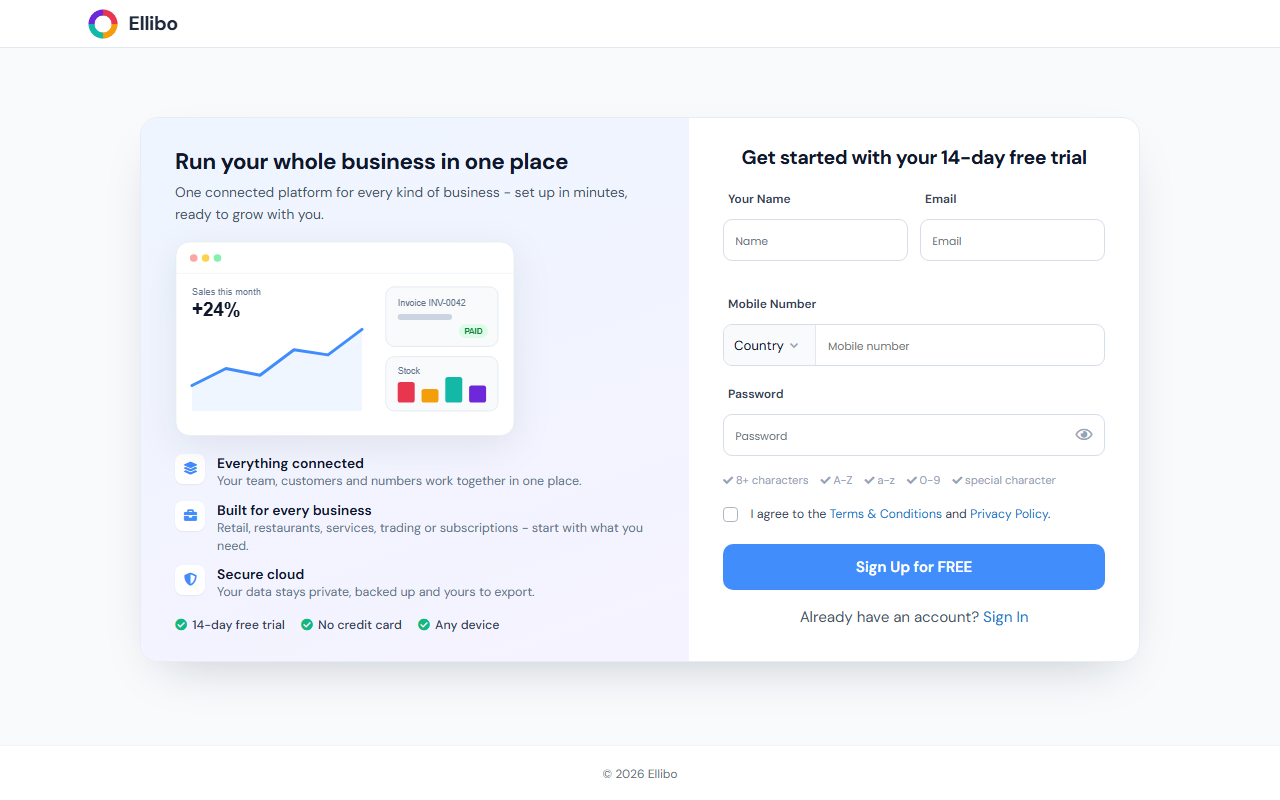
- Tick I agree to the Terms & Conditions and Privacy Policy.
- Click Sign Up for FREE.
Your account is ready, and you can carry on straight away.
Confirm your email
We send an email titled Verify your email address. Open it and click the link within 48 hours.
Until you confirm, the apps show a reminder at the top of the page with a Resend Verification Email button. Some features may be limited until your email is confirmed.
Tip
No email after a few minutes? Check your spam or promotions folder, then click Resend Verification Email in the app.
What's next
- Set up your business. Each app asks for your business details the first time you open it.
- Sign in and open an app