
Sign in and open an app
Sign in once and move between your Ellibo apps and businesses from the My Apps page.
Sign in
- Go to ellibo.com and click Login.
- Under User Name, enter the email you signed up with. Then enter your password and click Login.
Forgot your password? Click Forgot Password? on the sign-in page. We'll email you a link to set a new one.
Your apps
After signing in you land on My Apps, the home for your Ellibo account.
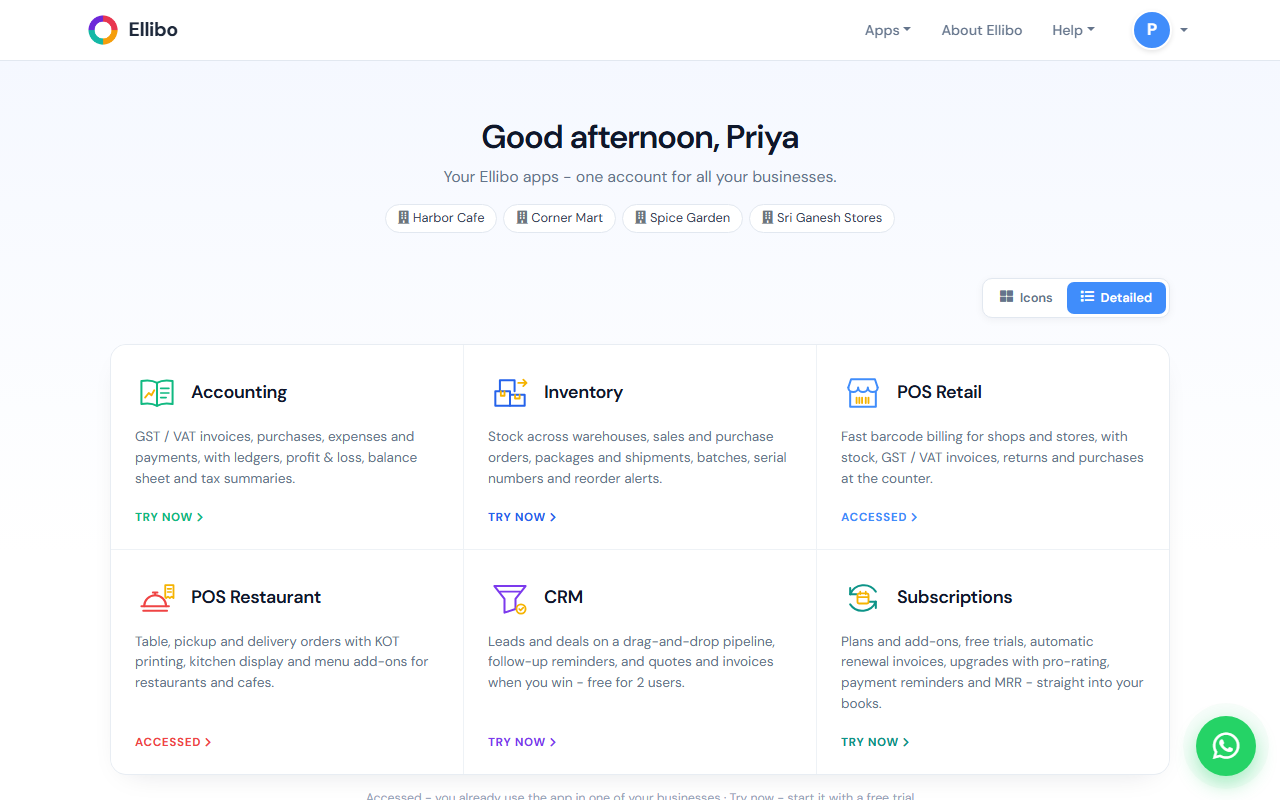
- Your businesses are listed at the top.
- Each app has a card. Accessed means you already use that app in one of your businesses. Try now starts the app with a free trial.
- Icons / Detailed switches between a compact grid and cards with descriptions.
Click an app's name to open it. To come back to My Apps later, use All Apps in the app's menu, or click your initial at the top right of the website and choose My Apps.
Your account settings
Click your initial at the top right of the website and choose My Account. There you can:
- change your display name and password
- add more mobile numbers and email addresses
- see your businesses and their details
- see your recent sign-ins
Note
Each app keeps its own list of users and roles. Signing in with Ellibo doesn't give someone access to your business. You invite each person into the apps they need. See Invite your team.