
Get started with Subscriptions
Set up Subscriptions for your business and follow the setup guide from your first plan to your first subscription.
Ellibo Subscriptions bills customers who pay you regularly: a weekly box, a monthly service, a yearly maintenance contract. Each renewal makes an invoice in your books, so Ellibo Accounting always has the full picture.
Set up Subscriptions
- Open Subscriptions from My Apps.
- Choose a business you already run on Ellibo and click Start Subscriptions, or create a new business.
The setup guide
The Dashboard shows a setup guide until every step is done:
- Check your business details
- Make your plans: what you sell, at what price, and how often. See Plans and add-ons.
- Check your billing preferences: when invoices are due, whether they're emailed, how plan changes are charged, and when payment reminders go out. Click Keep the defaults if they suit you.
- Add your first subscription
- Invite your team
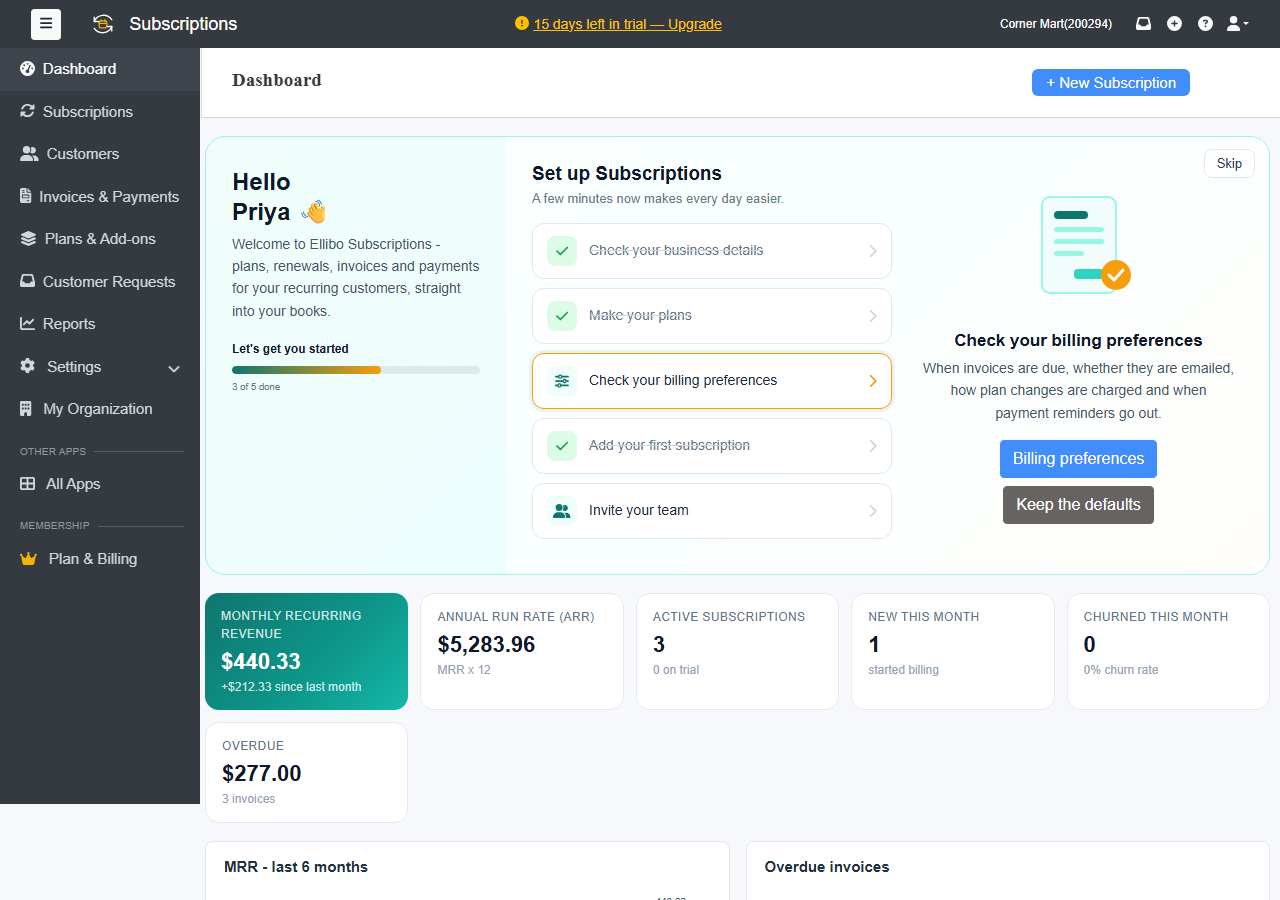
The Dashboard
- Monthly recurring revenue (MRR): what your subscriptions bring in each month, and the change since last month.
- Annual run rate (ARR): MRR × 12.
- Active subscriptions, New this month and Churned this month
- Overdue: unpaid subscription invoices.
- MRR - last 6 months and the list of Overdue invoices
Click + New Subscription at the top to add one.