
Expenses
Record the costs of running your business, such as rent, fuel or electricity, in a few seconds, with the GST you can claim back.
Use an expense for costs that aren't stock you sell. For goods you buy to sell, record a purchase bill instead.
Record an expense
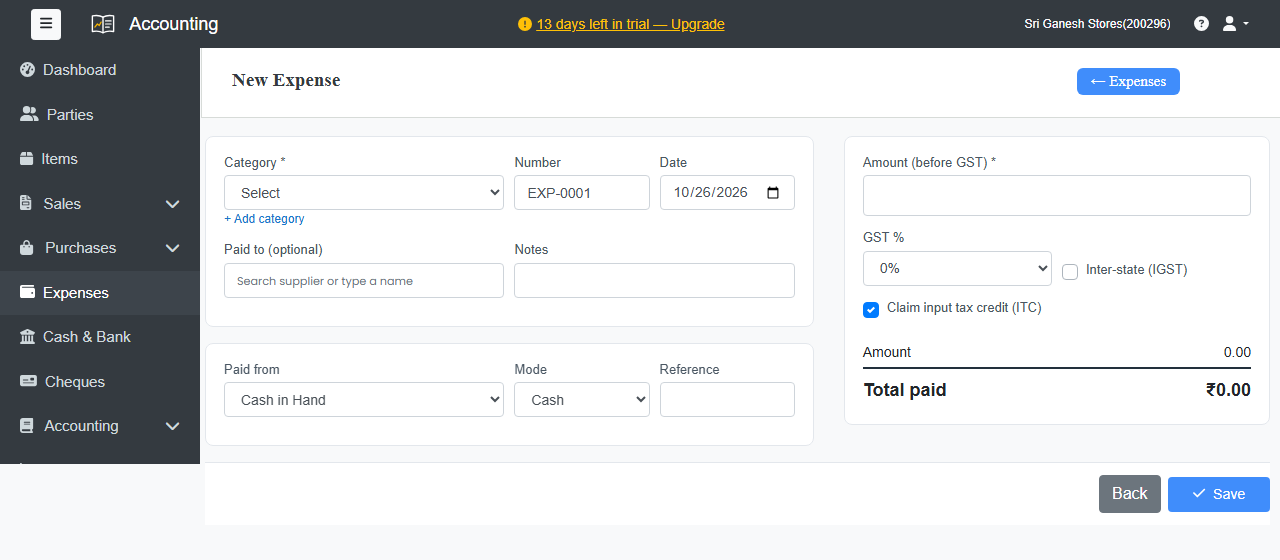
- Go to Expenses and click + New Expense.
- Choose the Category, such as Rent or Electricity. To make a new one, click + Add category.
- Check the Date. Optional: who you Paid to, and Notes.
- Under Paid from, choose the cash or bank account, the Mode and a Reference.
- Enter the Amount (before GST) and the GST %.
- Leave Claim input tax credit (ITC) ticked if you can claim the tax back. Untick it if you can't. Choose Inter-state (IGST) if the supplier is in another state.
- Click Save.
See your expenses
The Expenses list shows every expense. Use Show to filter, and Excel to download. The Expense Summary report totals them by category and month.
Recurring expenses
For costs that repeat, such as rent, click Recurring Expenses on the Expenses page. See Recurring invoices, bills and expenses.