
GST setup
Turn on GST, add your GSTIN and state, and let Ellibo work out CGST, SGST and IGST on every invoice and bill.
Turn on GST
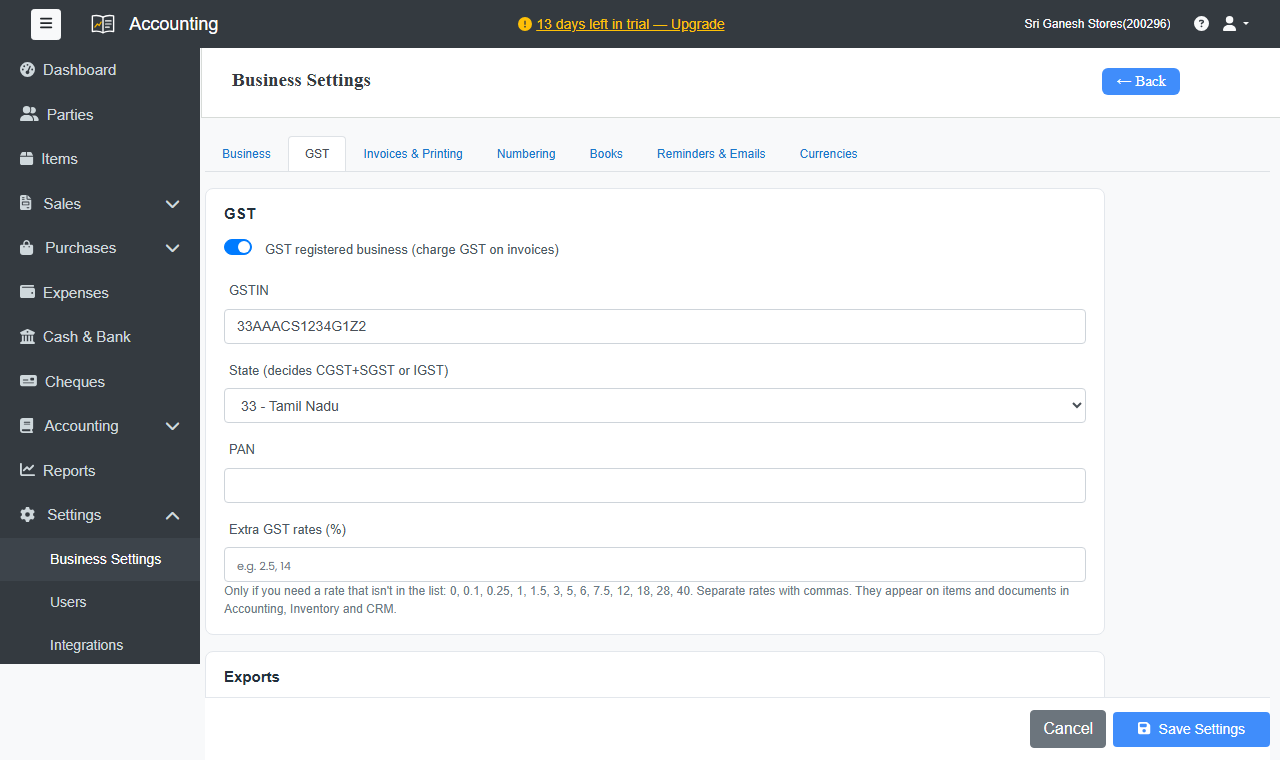
- Go to Settings › Business Settings › GST.
- Turn on GST registered business (charge GST on invoices).
- Enter your GSTIN.
- Choose your State (decides CGST+SGST or IGST).
- Enter your PAN.
- Click Save Settings.
How GST is worked out
Each invoice has a Place of Supply. It's taken from the customer's state, and you can change it.
- Same state as yours: the GST rate is split into CGST + SGST. For example, 5% becomes 2.5% + 2.5%.
- Another state: the full rate is charged as IGST.
- Exports: charged with IGST, or without IGST under your LUT / bond number (ARN).
You choose the GST rate on each item or line from the standard rates: 0, 0.1, 0.25, 1, 1.5, 3, 5, 6, 7.5, 12, 18, 28 and 40%. Need another rate? Add it under Extra GST rates.
Your items and customers
- Give each item its HSN/SAC code and GST rate. See Items.
- Enter registered customers' and suppliers' GSTIN, and choose their GST type. See Customers and suppliers.
- Not registered for GST? Leave it off. Invoices are made out without GST.