
Recurring invoices, bills and expenses
Let Ellibo create the same invoice, bill or expense for you every week, month or year, such as rent, retainers or service contracts.
Recurring documents are part of the Professional plan and above.
Make an invoice recurring
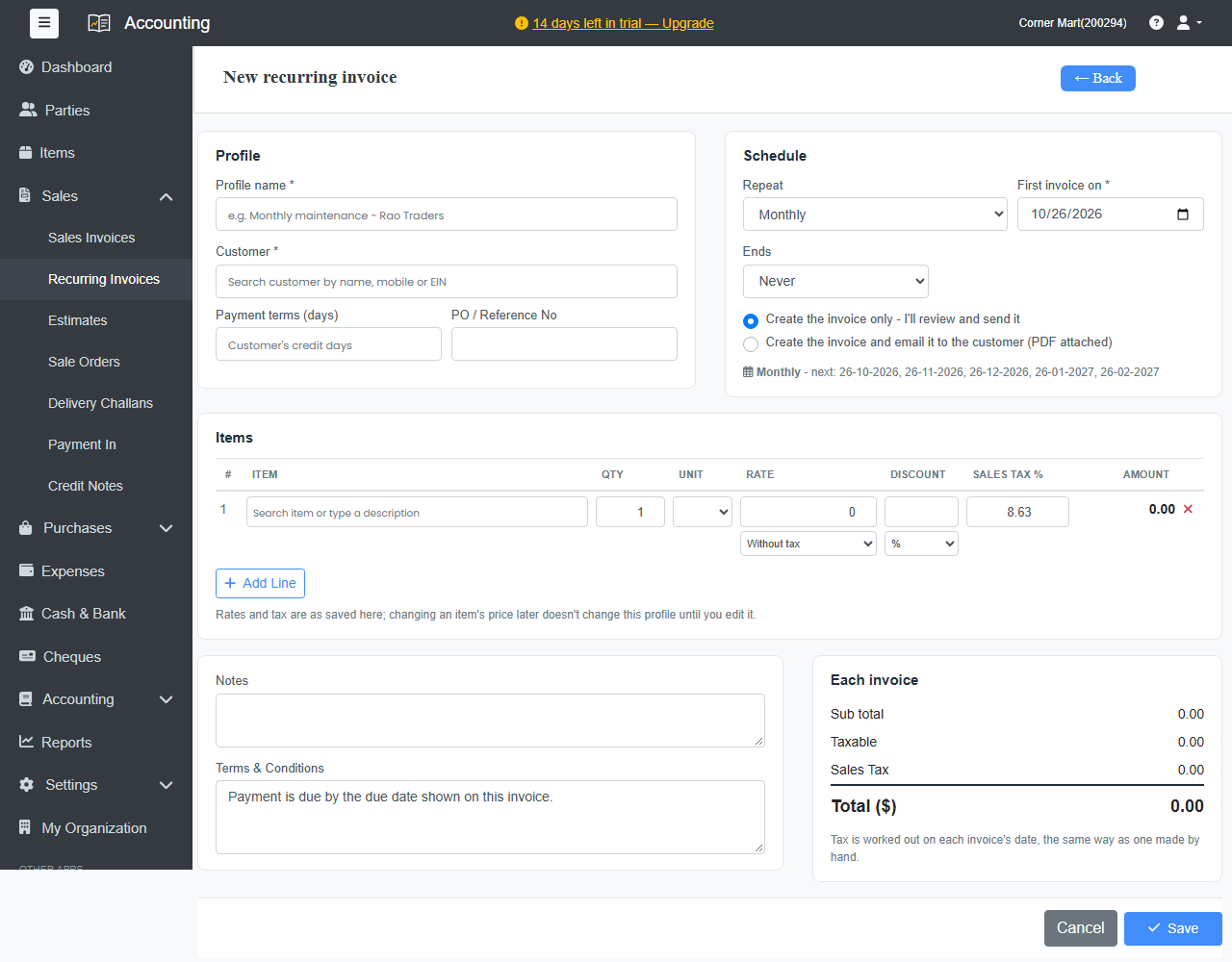
- Open an invoice you've already made and click Make recurring. You can also go to Sales › Recurring Invoices and create a new profile.
- Give it a Profile name, for example Monthly maintenance – Bayview Bistro.
- Under Repeat, choose when the First invoice is made and how often: Every so many days, weeks, months or years.
- Choose when it Ends: Never, On a date, or After a number of invoices.
Choose what happens each time:
- Create the invoice only - I'll review and send it, or
- Create the invoice and email it to the customer (PDF attached).
- Set the Payment terms (days) for each invoice, check the items, and save.
Ellibo creates each invoice on its date. Open the profile to see every invoice it has made. From there you can pause or resume it, skip the next one, make the next one now, or stop it.
Recurring bills and expenses
The same works for regular costs: Purchases › Recurring Bills for supplier bills, and Expenses › Recurring Expenses for rent, salaries or subscriptions you pay.
Default choice
Settings › Business Settings › Reminders & Emails › Recurring Invoices sets whether new recurring invoices are only created, or created and emailed. You can still change it on each profile.