
Get started with Accounting
Set up your books in a few minutes, then send your first invoice. The setup guide on the Dashboard walks you through each step.
Ellibo Accounting keeps your books for you. Every invoice, bill, expense and payment you record updates your ledgers, stock and reports automatically. You don't need to know double-entry bookkeeping.
Set up Accounting for your business
- Open Accounting from My Apps.
- Choose a business you already run on Ellibo and click Set up Accounting. You can also click Create a new business to start fresh books.
- Your books are ready. Business Settings opens so you can check your tax details first. See Business settings.
Note
Books for a business you already use in POS or Inventory share the same customers, items and documents. You don't enter anything twice.
The setup guide
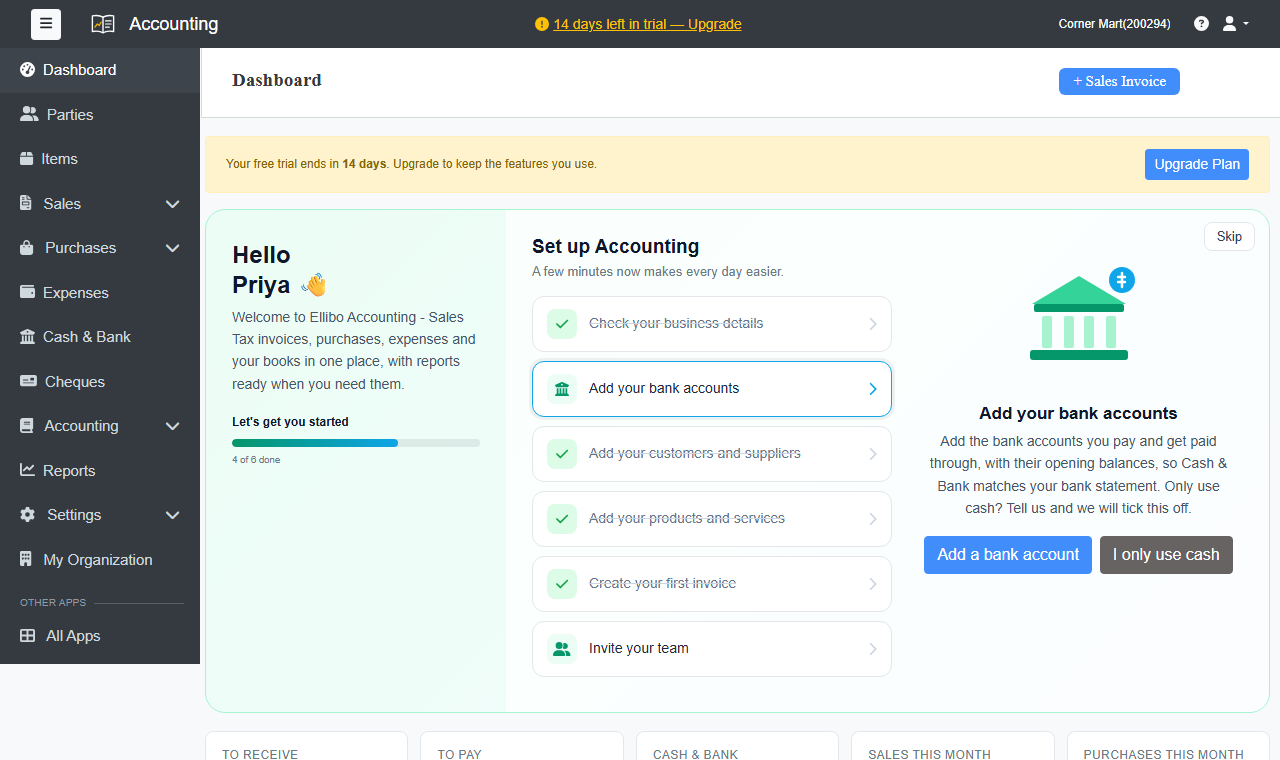
The Dashboard shows a setup guide until every step is done:
- Check your business details: address, contact details and tax number for your invoices.
- Add your bank accounts: with their opening balances, so Cash & Bank matches your statement. Only use cash? Click I only use cash.
- Add your customers and suppliers.
- Add your products and services.
- Create your first invoice.
- Invite your team.
Find your way around
| Menu | What's there |
|---|---|
| Dashboard | What customers owe you, what you owe, cash and bank, and this month's sales, purchases and expenses. |
| Parties | Your customers and suppliers. |
| Items | Products and services, with prices, tax and stock. |
| Sales | Invoices, recurring invoices, estimates, sale orders, delivery challans, payments in and credit notes. |
| Purchases | Bills, recurring bills, purchase orders, payments out and debit notes. |
| Expenses, Cash & Bank, Cheques | Day-to-day money in and out. |
| Accounting | Chart of accounts and journal entries. |
| Reports | Financial statements, party balances, registers and tax summary. |
| Settings | Business settings, users and integrations. |