
Customers and suppliers
Parties are the people and businesses you sell to and buy from. Add them once and pick them on every invoice, bill and payment.
Add a party
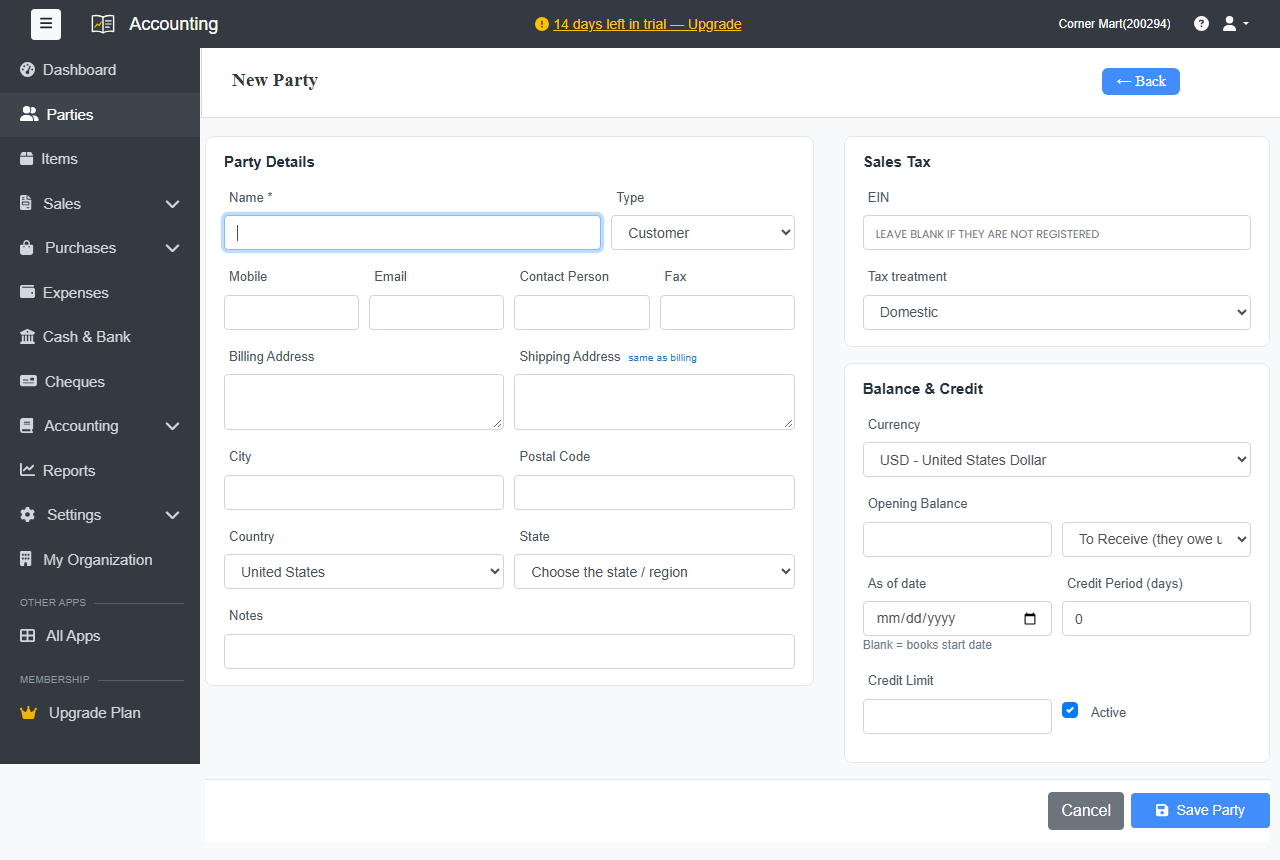
- Go to Parties and click + New Party.
- Enter the Name and choose the Type: Customer, Supplier or both.
- Add the contact details you have: Mobile, Email, Contact Person, Billing Address and Shipping Address, City, Postal Code, Country and State.
Under Sales Tax:
- Enter their tax number, or leave it blank if they're not registered.
- Choose the Tax treatment, for example Domestic or an export.
Under Balance & Credit:
- Currency: bill this party in their own currency. See Multi-currency.
- Opening Balance: what they owe you (or you owe them) on your books start date.
- Credit Period (days): sets the due date on their invoices.
- Credit Limit
- Click Save Party.
You can also add a customer while making an invoice: type the name and click + Add new customer.
The party page
Open a party to see everything in one place: their invoices or bills, payments and what they owe. Buttons at the top let you make a Sales Invoice, Receive Payment, send a Reminder, make a Purchase Bill or Make Payment. Click Print for their statement.
On the Parties list, use Customers and Suppliers to filter, and Statement to open a party's statement directly.
Turn a party off
Untick Active on a party you no longer deal with. They disappear from the pick lists, but their history stays.