
Items
Save the products and services you sell or buy with their prices, tax rate and stock, so invoices fill themselves in.
Add an item
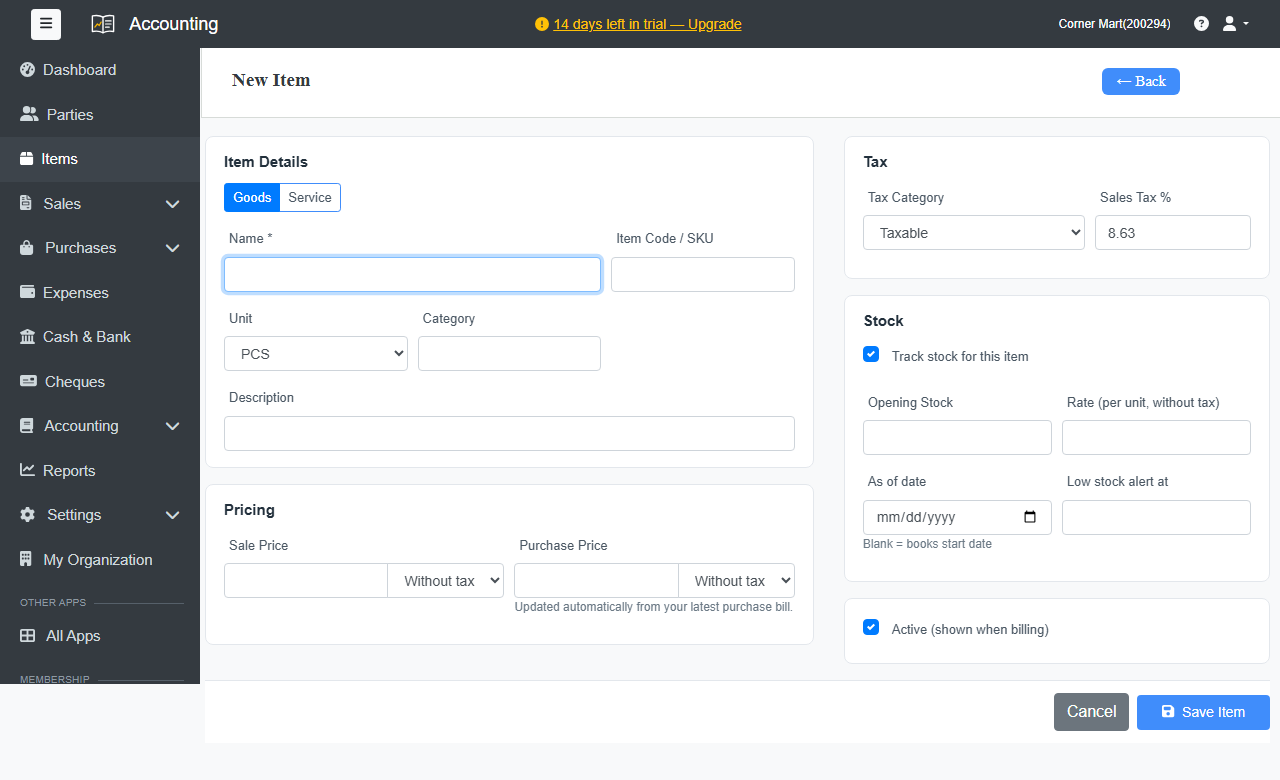
- Go to Items and click + New Item.
- Choose Goods or Service.
- Enter the Name, and if you like an Item Code / SKU, Unit, Category and Description.
- Under Pricing, enter the Sale Price and Purchase Price. For each, choose whether the price is Without tax or With tax. The purchase price updates itself from your latest bill.
- Under Tax, choose the Tax Category, usually Taxable, and the Sales Tax %.
- For goods, leave Track stock for this item ticked to keep count. Enter the Opening Stock, its Rate (per unit, without tax), and a Low stock alert at level.
- Click Save Item.
Stock
With stock tracking on, invoices take stock out and bills put it in. The Items list shows what's in hand, and the Dashboard warns you about items at or below their alert level. For an adjustment, such as damaged goods, open the item and click Adjust Stock.
The Stock Summary report shows the quantity and value of every item.
Tip
Need warehouses, batches, serial numbers or barcodes? Use Ellibo Inventory. It shares these items with Accounting.