
Tax setup
Set your tax name, standard rate and tax number once, and Ellibo charges and reports the tax on every invoice, bill and expense.
Ellibo works with the way tax is charged in your country, whether it's VAT, GST or sales tax.
Turn on tax
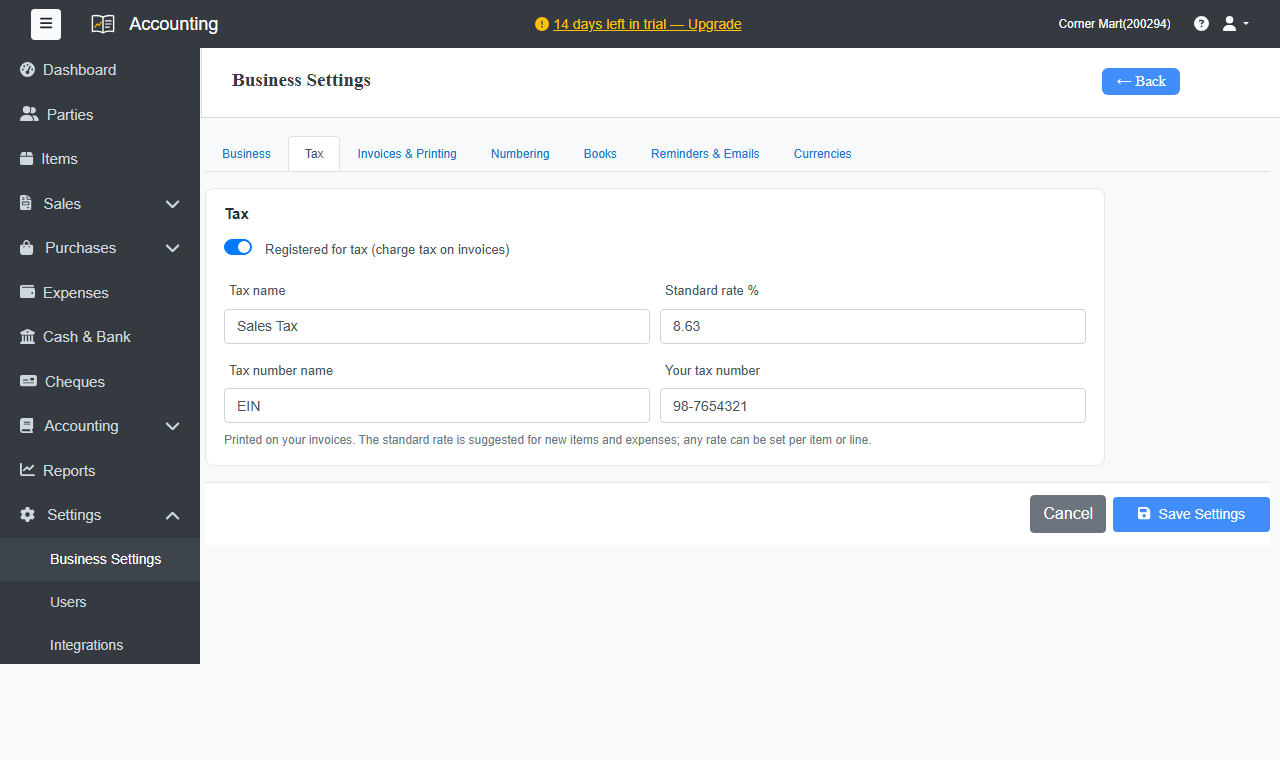
- Go to Settings › Business Settings › Tax.
- Turn on Registered for tax (charge tax on invoices).
- Enter the Tax name, for example VAT, GST or Sales Tax. It's used on invoices, forms and reports.
- Enter your Standard rate %, for example 20. It's suggested for new items and expenses.
- Enter the Tax number name, for example VAT No, ABN or TRN, and Your tax number.
- Click Save Settings.
Rates on items and lines
The standard rate is only a starting point. Set the right rate on each item, such as 0% for zero-rated goods, and change it on any invoice line when needed.
Customers and tax treatment
On each customer or supplier, enter their tax number and choose the Tax treatment:
- Domestic: your tax is charged as usual.
- Export (zero-rated): sales abroad, with no tax charged.
- Reverse charge: the customer accounts for the tax themselves, so none is charged on your invoice.
Not registered for tax?
Leave Registered for tax off. Your invoices are made out without tax.