
Deals and the pipeline
See every deal by stage, drag it forward as it moves, and drop it on Won or Lost to close it.
A deal is a sale you're working on, with a value and an expected close date.
Add a deal
- Go to Deals and click + New deal, or click + Add deal under a stage.
- Enter the deal name, the customer (company or contact), the Amount and the expected Close date.
- Choose the pipeline and stage, the owner and the source.
- Save.
The board
Deals shows your pipeline as a board, with one column per stage. Each column shows the number of deals and their value. Each card shows the customer, amount, close date and owner, and the next follow-up.
- Drag a deal to the next stage as it moves.
- Drop it on Won or Lost to close it.
- No follow-up planned on a card means nothing is scheduled. Plan the next step so the deal doesn't go cold.
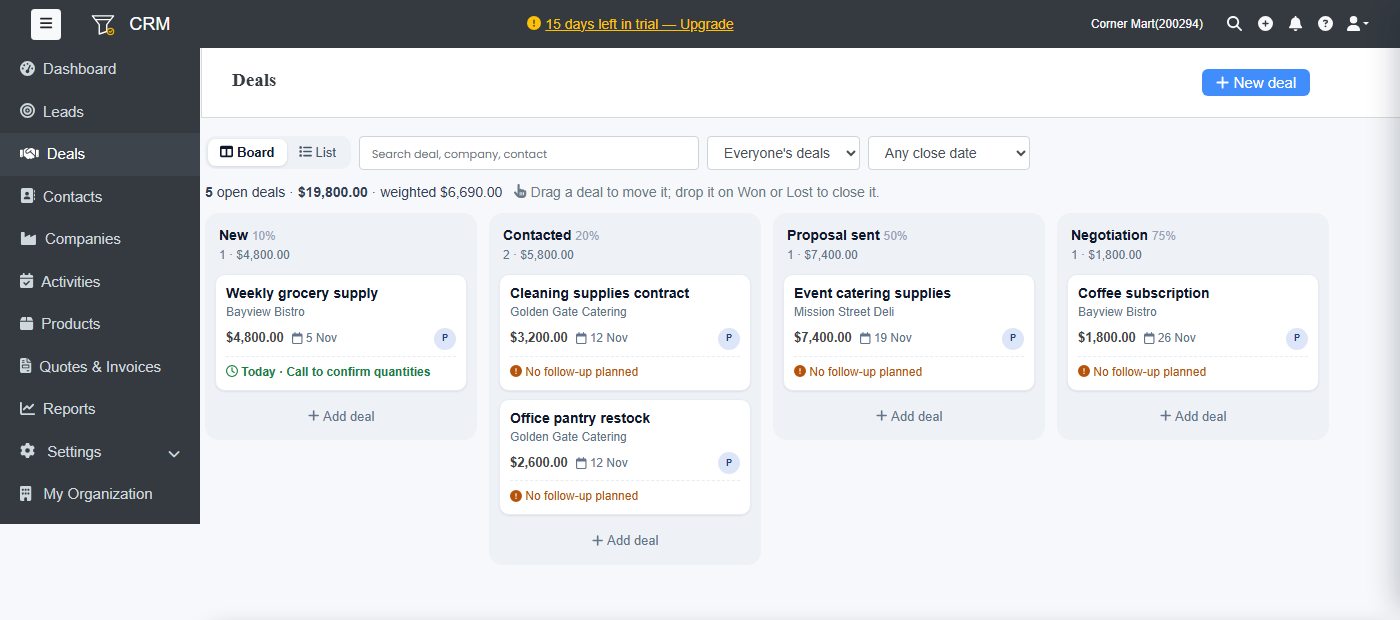
Switch to List for a table you can sort and export. Filter with the search box, Everyone's deals (or just yours) and the close date.
The top line shows the number of open deals, their value, and the weighted value: each deal's amount times its stage probability.
Won and lost
Open a deal and click Won or Lost. For a lost deal, choose Why was it lost? and add a note. The Lost reasons report shows what to fix first. Click Reopen if it comes back.
When you win, create the invoice from the deal. See Quotes and invoices. For a repeat service, click Start a subscription to bill it automatically with Ellibo Subscriptions.
Products on a deal
Add the products the customer wants on the deal and click Save products. They go straight into the quote when you make it.