
Get started with CRM
Set up CRM for your business, then follow the setup guide from your pipeline to your first follow-up.
Ellibo CRM helps you turn enquiries into sales. Capture leads, plan follow-ups, move deals across your pipeline, and send quotes and invoices when you win. Your customers, products and invoices are shared with Ellibo Accounting and Inventory.
Set up CRM
- Open CRM from My Apps.
- Choose a business you already run on Ellibo and click Start CRM, or create a new business.
The setup guide
The Dashboard shows a setup guide until every step is done:
- Check your business details
- Set up your deals pipeline: a pipeline is ready for you: New → Contacted → Proposal sent → Negotiation → Won → Lost. Click Use this pipeline, or Change stages to match how you sell.
- Add or import your contacts
- Add your first lead or deal
- Schedule a follow-up
- Invite your team
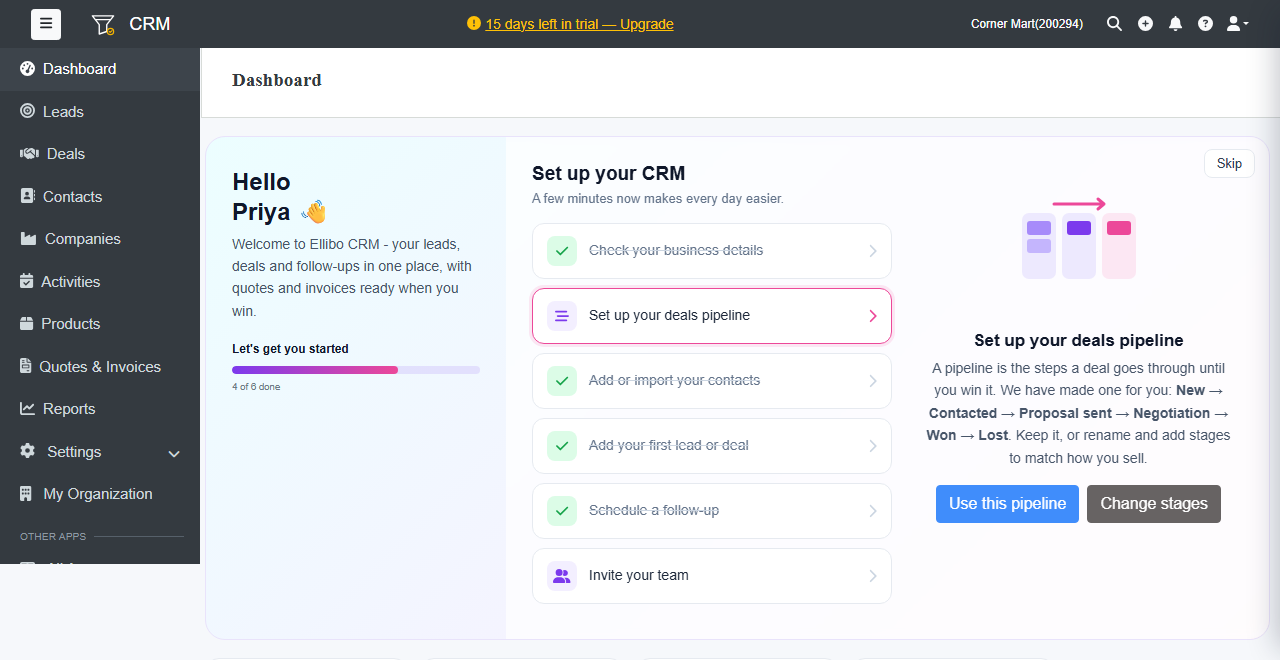
The Dashboard
- Open pipeline: the value of your open deals, and the weighted value by stage probability.
- Won this month, New leads and Win rate
- My to-dos: your calls, meetings and tasks for today.
- Deals needing attention: deals with nothing planned, or stuck in a stage too long.
- Target: this month's sales target and whether you're on track, plus the wins of the last 6 months. See Saved views, sales targets and the calendar.
- Recent updates: what your team did lately.
Quick tools in the top bar
- Search finds any lead, deal, contact, company or invoice. Press Ctrl + K (or /) to open it from anywhere.
- + adds a lead, deal, contact, company, follow-up, quote or invoice from anywhere.
- Bell: your notifications, such as a lead given to you.