
Connect Braintree
Take cards, PayPal, Apple Pay and Google Pay on a secure Braintree card form, through your own Braintree account - Merchant ID, keys, sandbox testing and going live.
Braintree (a PayPal company) lets customers pay by card, PayPal, Apple Pay and Google Pay on a secure Braintree form. The payment is taken while the customer is on the page, so no webhook is needed.
Before you start
- A Braintree merchant account, approved for your country and business.
- For testing, a free sandbox account at sandbox.braintreegateway.com. It has its own keys.
- You must be an admin of the business in Ellibo.
Step 1: Get your keys
Sign in to the Braintree Control Panel (or the sandbox), and click the gear icon at the top right.
- Merchant ID: gear › Business - it's at the top of the page. (It also appears in the web address after
/merchants/.) - Public Key: gear › API › API Keys. If the list is empty, click Generate New API Key.
- Private Key: in the same row, click View under Private Key.
- Merchant account ID (optional): gear › Business › Merchant Accounts. You only need it to charge in a currency other than your default merchant account's.
Step 2: Connect in Ellibo
- Open Settings › Integrations › Payments.
- On the Braintree tile, click Connect.
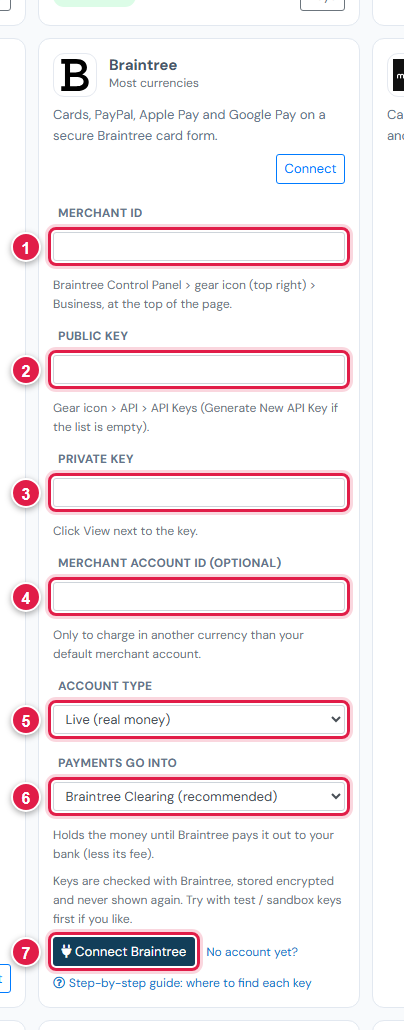
| # | Field | What to enter |
|---|---|---|
| 1 | Merchant ID | From gear › Business |
| 2 | Public Key | From gear › API |
| 3 | Private Key | From gear › API › View |
| 4 | Merchant account ID | Optional - leave blank for your default |
| 5 | Account type | Test / sandbox for sandbox keys, Live for production |
| 6 | Payments go into | Keep Braintree Clearing (recommended) |
| 7 | Connect Braintree | Click it |
Step 3: Try a sandbox payment
- With sandbox keys connected, open a small invoice's Pay now link and choose Braintree.
- Pay with the test card
4111 1111 1111 1111and any future date. - Check the invoice shows Paid, then cancel the test receipt.
Step 4: Go live
- Sign in at braintreegateway.com (production) and copy the live Merchant ID and keys.
- In Ellibo, click Keys, paste them, set Account type to Live, and Save.
Fees, payouts and refunds
- Braintree pays out to your bank, usually within a couple of working days. Record payouts in Accounting › Online Payments.
- Refund with the Refund button in Ellibo.
If something goes wrong
| Problem | Fix |
|---|---|
| Keys not accepted | Sandbox and production keys are different logins. Match Account type to where you copied them. |
| Wrong currency charged | Add the Merchant account ID for the currency you invoice in. |
| The card form doesn't load for a customer | Ask them to allow scripts on the page or try another browser. |
See also Fix payment problems.