
Connect Xendit
Take cards, e-wallets, bank transfer and QR payments in South East Asia through your own Xendit account - secret key with the right permission, webhook and going live.
Xendit lets customers pay by card, e-wallet, bank transfer and QR in Indonesia, the Philippines, Malaysia, Thailand and Vietnam (IDR, PHP, MYR, THB, VND, USD).
Before you start
- A Xendit account. Test mode works straight away; live mode needs your business activated with documents.
- Only an Admin (or a user with Tech Settings access) in Xendit can make keys.
Step 1: Make a secret key
- Sign in to the Xendit Dashboard and choose Test or Live mode at the top left.
- Go to Settings › Developers › API Keys › Generate Secret Key.
- Name it (for example Ellibo) and set Money-in products to Write. Leave the others as they are.
- Confirm with your password and copy the key - it starts with
xnd_development_(test) orxnd_production_(live). It's shown only once.
Step 2: Connect in Ellibo
- Open Settings › Integrations › Payments.
- On the Xendit tile, click Connect.
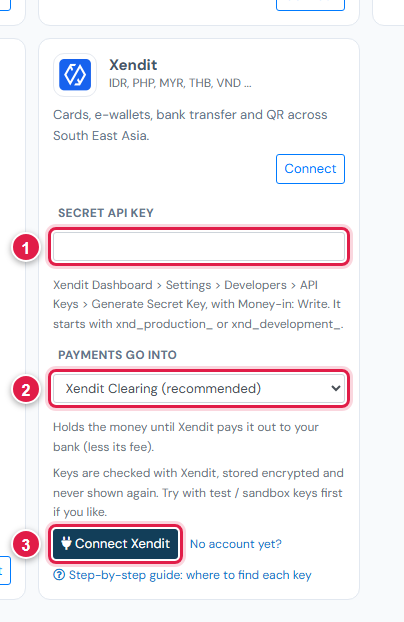
| # | Field | What to enter |
|---|---|---|
| 1 | Secret API key | xnd_development_… or xnd_production_… |
| 2 | Payments go into | Keep Xendit Clearing (recommended) |
| 3 | Connect Xendit | Click it |
Step 3: Add the webhook
- In Ellibo, under Your gateways › Xendit, click Copy next to Webhook URL.
- In Xendit, go to Settings › Developers › Webhooks (same mode).
- Paste the address in the field for invoice payments - called Invoices paid on most dashboards, or the invoice payment event on newer ones.
- Save. Test and live have separate webhook settings.
Step 4: Try a test payment
- With the test key connected, open a small invoice's Pay now link and choose Xendit.
- Pay with a test method; Xendit's test checkout lets you simulate the payment.
- Check the invoice shows Paid, then cancel the test receipt.
Step 5: Go live
Make a live secret key with Money-in products: Write, paste it in Ellibo under Keys, Save, and add the webhook in live mode.
Fees, payouts and refunds
- How fast money arrives depends on the method (bank transfers faster than cards). Record payouts in Accounting › Online Payments.
- Refund with the Refund button in Ellibo.
If something goes wrong
| Problem | Fix |
|---|---|
| Key not accepted | Make a new key with Money-in products: Write. |
| Paid but not showing | Add the webhook for invoice payments, in the same mode. Click Check payment on the invoice. |
See also Fix payment problems.