
Connect Mollie
Take cards, iDEAL, Bancontact, SEPA, Klarna, PayPal and more across Europe through your own Mollie account - one API key, no webhook to add.
Mollie lets customers pay with cards, iDEAL, Bancontact, SEPA bank transfer, Klarna, PayPal and other European methods. It takes EUR, GBP, USD, CHF, SEK, NOK, DKK, PLN, CZK, HUF, AUD and CAD. Ellibo tells Mollie where to report each payment, so there's no webhook to add.
Before you start
- A Mollie account for a business registered in the EEA, the UK or Switzerland. Sign up at mollie.com and finish onboarding (business details, bank account, ID check).
- A website profile in Mollie (Mollie asks for one when you sign up).
- In Mollie, switch on the payment methods you want to offer (Dashboard › Settings › Payment methods).
Step 1: Get your API key
- Sign in to the Mollie Dashboard.
- Go to Developers › API keys.
- Copy the Test API key (starts with
test_) to try first, or the Live API key (starts withlive_).
Step 2: Connect in Ellibo
- Open Settings › Integrations › Payments.
- On the Mollie tile, click Connect.
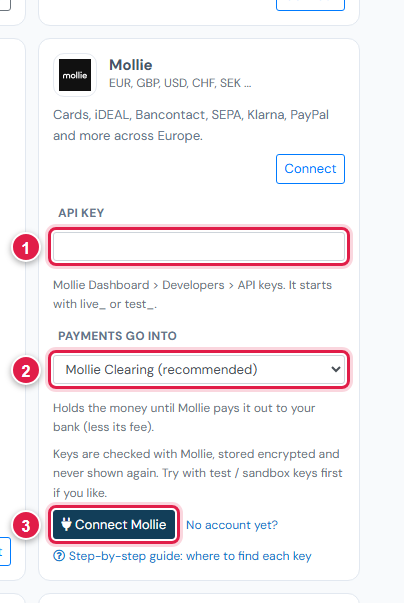
| # | Field | What to enter |
|---|---|---|
| 1 | API key | test_… or live_… |
| 2 | Payments go into | Keep Mollie Clearing (recommended) |
| 3 | Connect Mollie | Click it |
Ellibo works out test or live from the key.
Step 3: Try a test payment
- With the test key connected, open a small invoice's Pay now link and choose Mollie.
- Mollie shows a test page where you choose the result - pick Paid. (Test payments in Mollie are in EUR.)
- Check the invoice shows Paid, then cancel the test receipt.
Step 4: Go live
In Ellibo, click Keys, paste the Live API key, and Save. Make sure the methods you want are switched on in Mollie for live.
Fees, payouts and refunds
- Mollie pays out on the schedule you choose in Mollie (daily or weekly). Record payouts in Accounting › Online Payments.
- Refund with the Refund button in Ellibo.
If something goes wrong
| Problem | Fix |
|---|---|
| Mollie did not accept this API key | Copy it again; it starts with live_ or test_. Don't use an organisation access token. |
| A method (e.g. iDEAL) doesn't show | Switch it on in Mollie. Some methods only work for some currencies. |
| Test payment refused | Test mode supports EUR. Try with a EUR invoice. |
See also Fix payment problems.