
Connect GoCardless
Take bank payments (Pay by Bank) through your own GoCardless account - access token, webhook endpoint, sandbox testing and going live.
GoCardless lets customers pay straight from their bank account - no card needed. It works in the UK, Europe, the US, Canada, Australia and New Zealand (GBP, EUR, USD, CAD, AUD, NZD, SEK, DKK). Fees are usually lower than cards, which suits larger invoices.
Before you start
- A GoCardless account, with your business verified. Sign up at gocardless.com.
- Instant bank payments (Pay by Bank) must be switched on for your account - ask GoCardless if you're not sure.
- For testing, a free sandbox account at manage-sandbox.gocardless.com.
Step 1: Make an access token
- Sign in to the GoCardless Dashboard (or the sandbox).
- Go to Developers › Create › Access token.
- Name it (for example Ellibo) and choose Read-write access.
- Click Create and copy the token - it starts with
live_orsandbox_. It's shown only once.
Step 2: Connect in Ellibo
- Open Settings › Integrations › Payments.
- On the GoCardless tile, click Connect.
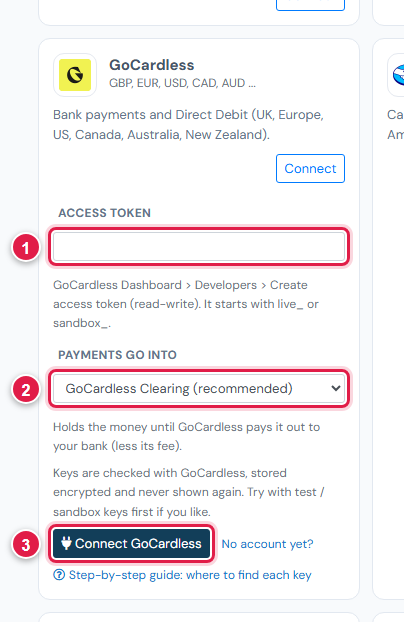
| # | Field | What to enter |
|---|---|---|
| 1 | Access token | live_… or sandbox_… |
| 2 | Payments go into | Keep GoCardless Clearing (recommended) |
| 3 | Connect GoCardless | Click it |
Ellibo works out sandbox or live from the token, and shows your business name.
Step 3: Add the webhook endpoint
- In Ellibo, under Your gateways › GoCardless, click Copy next to Webhook URL.
- In the GoCardless Dashboard, go to Developers › Create › Webhook endpoint.
- Name it, paste the address, and leave the secret blank so GoCardless makes one.
- Click Create. There are no events to tick - every event is sent.
Step 4: Try a sandbox payment
- With a sandbox token connected, open a small invoice's Pay now link and choose GoCardless.
- Follow the sandbox bank screens to approve the payment.
- Bank payments can take a moment to confirm. The pay page says being confirmed until GoCardless reports it.
- Check the invoice shows Paid, then cancel the test receipt.
Step 5: Go live
- Make a live read-write access token.
- In Ellibo, click Keys, paste it, and Save.
- Create the webhook endpoint again in the live dashboard.
Fees, payouts and refunds
- GoCardless collects payments into payouts to your bank, typically within a few working days. Record payouts in Accounting › Online Payments.
- Refund with the Refund button in Ellibo (if refunds are enabled on your GoCardless account).
If something goes wrong
| Problem | Fix |
|---|---|
| It must be read-write | Make a new token with Read-write access. |
| Payment stays being confirmed | Bank payments can take time. The webhook makes it show as soon as GoCardless confirms. |
| GoCardless isn't offered | The invoice's currency isn't one GoCardless takes. |
See also Fix payment problems.