
Connect Mercado Pago
Take cards, Pix, boleto and cash payments across Latin America through your own Mercado Pago account - access token, test buyers and going live. No webhook to add.
Mercado Pago lets customers pay by card, Pix, boleto, cash and Mercado Pago balance in Argentina, Brazil, Chile, Colombia, Mexico, Peru and Uruguay (ARS, BRL, CLP, COP, MXN, PEN, UYU). Ellibo tells Mercado Pago where to report each payment, so there's no webhook to add.
Before you start
- A Mercado Pago seller account in one of those countries.
- You must be an admin of the business in Ellibo.
Step 1: Get your access token
- Sign in at Mercado Pago Developers (developers in your country's Mercado Pago site).
- Open Your integrations and create an application (for example Ellibo, using Checkout Pro), or open an existing one.
- For testing: open Test credentials, accept the terms and click Activate credentials. Copy the Access Token.
- For live: open Production credentials, activate them, and copy the Access Token.
Use the Access Token, not the Public Key.
Step 2: Connect in Ellibo
- Open Settings › Integrations › Payments.
- On the Mercado Pago tile, click Connect.
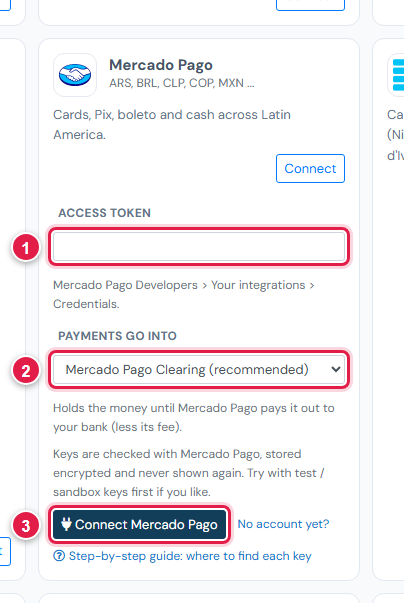
| # | Field | What to enter |
|---|---|---|
| 1 | Access token | Test or production |
| 2 | Payments go into | Keep Mercado Pago Clearing (recommended) |
| 3 | Connect Mercado Pago | Click it |
Ellibo treats tokens starting with TEST- as test mode.
Step 3: Try a test payment
- In your application, open Test accounts and create a buyer test account.
- Open a small invoice's Pay now link in a private (incognito) window and choose Mercado Pago.
- Sign in as the test buyer and pay with one of Mercado Pago's test cards for your country, with the cardholder name
APRO(approved). - Check the invoice shows Paid, then cancel the test receipt.
Step 4: Go live
In Ellibo, click Keys, paste the production Access Token, and Save.
Fees, payouts and refunds
- When the money is released to you depends on the release period you chose in Mercado Pago. Record transfers to your bank in Accounting › Online Payments.
- Refund with the Refund button in Ellibo.
If something goes wrong
| Problem | Fix |
|---|---|
| Token not accepted | Use the Access Token, not the Public Key. Production credentials must be activated first. |
| Mercado Pago isn't offered | The invoice's currency must be your country's currency. |
| Test payment rejected | Use a test card for your country and the cardholder name APRO, in a private window. |
See also Fix payment problems.