
Connect Tap Payments
Take mada, KNET, Benefit, cards and Apple Pay across the Gulf through your own Tap account - secret key, test cards and going live. No webhook to add.
Tap Payments lets customers pay with mada, KNET, Benefit, cards and Apple Pay in Kuwait, Saudi Arabia, the UAE, Bahrain, Qatar, Oman and Egypt (KWD, SAR, AED, BHD, QAR, OMR, EGP, plus USD, EUR and GBP). Ellibo tells Tap where to report each payment, so there's no webhook to add.
Before you start
- A Tap account. Sign up at tap.company, choose a plan and upload your business documents. Tap usually emails your keys within a day of activation.
- You must be an admin of the business in Ellibo.
Step 1: Get your secret key
- Sign in to the Tap Dashboard.
- Open goSell › API credentials (if your dashboard looks different, search for API keys).
- Copy the Secret key -
sk_test_…for the sandbox,sk_live_…for live. Don't use the publishable key.
Step 2: Connect in Ellibo
- Open Settings › Integrations › Payments.
- On the Tap Payments tile, click Connect.
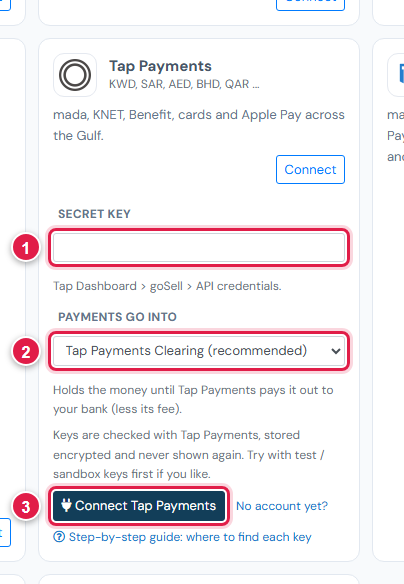
| # | Field | What to enter |
|---|---|---|
| 1 | Secret key | sk_test_… or sk_live_… |
| 2 | Payments go into | Keep Tap Payments Clearing (recommended) |
| 3 | Connect Tap Payments | Click it |
Step 3: Try a test payment
- With the test key connected, open a small invoice's Pay now link and choose Tap Payments.
- Pay with a Tap test card, for example
4508 7500 1574 1019(Visa), expiry01/39, CVV100. - Check the invoice shows Paid, then cancel the test receipt.
Step 4: Go live
In Ellibo, click Keys, paste the sk_live_… key, and Save.
Fees, payouts and refunds
- Tap pays out on the schedule in your Tap agreement. Record payouts in Accounting › Online Payments.
- Refund with the Refund button in Ellibo.
If something goes wrong
| Problem | Fix |
|---|---|
| Key not accepted | Use the Secret key, starting with sk_. |
| mada or KNET not shown | Ask Tap to enable that method on your account. |
See also Fix payment problems.