
Connect Paymob
Take cards, mobile wallets, kiosk payments and installments in Egypt, Saudi Arabia, the UAE, Oman and Pakistan through your own Paymob account - keys, Integration IDs and region.
Paymob lets customers pay by card, mobile wallet, Fawry and kiosk, and installments in Egypt, Saudi Arabia, the UAE, Oman and Pakistan (EGP, SAR, AED, OMR, PKR). Ellibo tells Paymob where to report each payment, so there's no webhook to add.
Before you start
- A Paymob merchant account with KYC done.
- Each way of paying (card, wallet, kiosk ...) has its own Integration ID in Paymob. Ask Paymob to enable the ones you want.
Step 1: Get your keys and Integration IDs
- Sign in to the Paymob Dashboard.
- Use the Test / Live switch at the top right to choose the mode.
- Go to Settings › Developers › API Keys and click View next to each key. Copy the Public key, the Secret key and the API key.
- Go to Settings › Payment Integrations. Copy the ID of each payment method you want to offer.
Step 2: Connect in Ellibo
- Open Settings › Integrations › Payments.
- On the Paymob tile, click Connect.
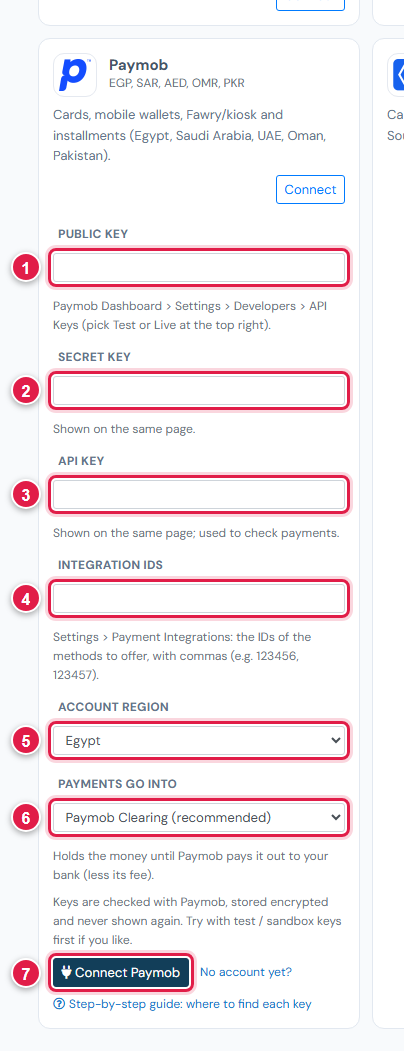
| # | Field | What to enter |
|---|---|---|
| 1 | Public key | e.g. egy_pk_test_… |
| 2 | Secret key | e.g. egy_sk_test_… |
| 3 | API key | The long API key (the same in test and live) |
| 4 | Integration IDs | The IDs of the methods to offer, with commas, e.g. 123456, 123457 |
| 5 | Account region | Egypt, Saudi Arabia, UAE, Oman or Pakistan |
| 6 | Payments go into | Keep Paymob Clearing (recommended) |
| 7 | Connect Paymob | Click it |
Step 3: Try a test payment
- With test keys and test Integration IDs connected, open a small invoice's Pay now link and choose Paymob.
- Pay with a test card from Paymob's Test credentials guide.
- Check the invoice shows Paid, then cancel the test receipt.
Step 4: Go live
Switch Paymob to Live, copy the live Public and Secret keys and the live Integration IDs (they differ from the test ones), paste them in Ellibo under Keys, and Save.
Fees, payouts and refunds
- Paymob pays out according to your agreement. Record payouts in Accounting › Online Payments.
- Refund with the Refund button in Ellibo.
If something goes wrong
| Problem | Fix |
|---|---|
| A method isn't shown to customers | Add its Integration ID, and check it belongs to the same mode (test or live) as your keys. |
| Keys not accepted | Pick the right Account region, and copy keys from the same mode. |
See also Fix payment problems.