
Connect Flutterwave
Take cards, mobile money and bank transfer across Africa through your own Flutterwave account - secret key, webhook, test mode and going live.
Flutterwave lets customers pay by card, mobile money and bank transfer across Africa (NGN, GHS, KES, ZAR, UGX, TZS, RWF, XAF, XOF, plus USD, EUR and GBP).
Before you start
- A Flutterwave business account. Test keys work straight away; live mode needs your business approved (KYB).
- You must be an admin of the business in Ellibo.
Step 1: Get your secret key
- Sign in to the Flutterwave Dashboard.
- Go to Settings › API Keys (under Developers).
- Use the Test / Live switch in the settings menu to choose the mode.
- Copy the Secret Key - it starts with
FLWSECK, and test keys containTEST.
Step 2: Connect in Ellibo
- Open Settings › Integrations › Payments.
- On the Flutterwave tile, click Connect.
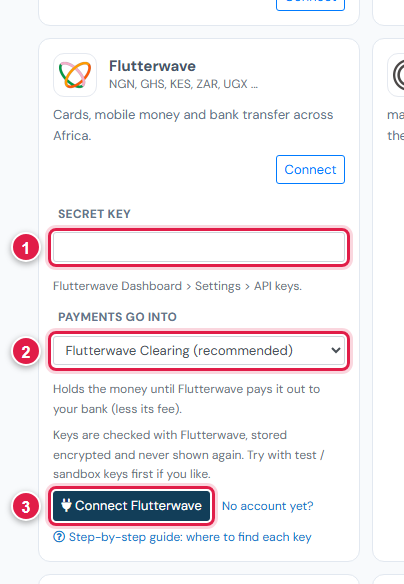
| # | Field | What to enter |
|---|---|---|
| 1 | Secret key | FLWSECK_TEST-… or FLWSECK-… |
| 2 | Payments go into | Keep Flutterwave Clearing (recommended) |
| 3 | Connect Flutterwave | Click it |
Step 3: Add the webhook
- In Ellibo, under Your gateways › Flutterwave, click Copy next to Webhook URL.
- In Flutterwave, go to Settings › Webhooks (same mode).
- Paste the address and tick all the boxes.
- Flutterwave asks for a secret hash - type any password of your own. (Ellibo checks every payment directly with Flutterwave, so it isn't needed in Ellibo.)
- Click Save.
Step 4: Try a test payment
- With the test key connected, open a small invoice's Pay now link and choose Flutterwave.
- Pay with one of the test cards in Flutterwave's developer docs.
- Check the invoice shows Paid, then cancel the test receipt.
Step 5: Go live
Switch Flutterwave to Live, copy the live secret key, paste it in Ellibo under Keys, Save, and add the webhook again in live mode.
Fees, payouts and refunds
- Flutterwave usually pays out the next working day for local currencies. Record payouts in Accounting › Online Payments.
- Refund with the Refund button in Ellibo.
If something goes wrong
| Problem | Fix |
|---|---|
| Key not accepted | Use the Secret key, from the same mode you want. |
| Flutterwave isn't offered | The invoice's currency isn't one Flutterwave takes. |
See also Fix payment problems.