
Connect Paystack
Take cards, bank transfer, USSD and mobile money in Africa through your own Paystack account - secret key, webhook URL, test card and going live.
Paystack lets customers pay by card, bank transfer, USSD and mobile money in Nigeria, Ghana, South Africa, Kenya, Côte d'Ivoire and Egypt (NGN, GHS, ZAR, KES, USD, XOF, EGP).
Before you start
- A Paystack business account. Test keys work straight away; live mode needs your account activated with business documents.
- You must be an admin of the business in Ellibo.
Step 1: Get your secret key
- Sign in to the Paystack Dashboard.
- Go to Settings › API Keys & Webhooks.
- Under API Configuration - Test Mode, reveal and copy the Test Secret Key (
sk_test_…). Later, use Live Mode forsk_live_….
Step 2: Connect in Ellibo
- Open Settings › Integrations › Payments.
- On the Paystack tile, click Connect.
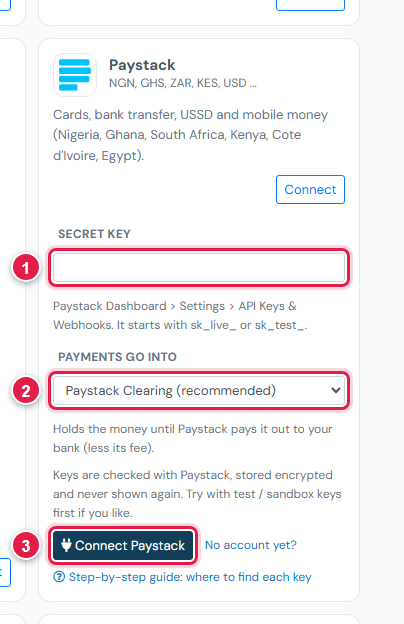
| # | Field | What to enter |
|---|---|---|
| 1 | Secret key | sk_test_… or sk_live_… |
| 2 | Payments go into | Keep Paystack Clearing (recommended) |
| 3 | Connect Paystack | Click it |
Step 3: Add the webhook URL
- In Ellibo, under Your gateways › Paystack, click Copy next to Webhook URL.
- In Paystack, on the same API Keys & Webhooks page, paste it into Webhook URL for the matching mode (test or live).
- Click Save changes.
Step 4: Try a test payment
- With the test key connected, open a small invoice's Pay now link and choose Paystack.
- Pay with Paystack's test card
4084 0840 8408 4081, any future date, and the details shown on Paystack's test page. - Check the invoice shows Paid, then cancel the test receipt.
Step 5: Go live
- When your account is activated, copy the Live Secret Key.
- In Ellibo, click Keys, paste it, and Save.
- Add the webhook URL in the Live Mode section too.
Fees, payouts and refunds
- Paystack usually pays out the next working day. Record payouts in Accounting › Online Payments.
- Refund with the Refund button in Ellibo.
If something goes wrong
| Problem | Fix |
|---|---|
| Key not accepted | Use the Secret key (sk_…), not the Public key (pk_…). |
| Paid but not showing | Add the webhook URL in the same mode as your key. Click Check payment on the invoice. |
See also Fix payment problems.