
Connect PayTabs
Take mada, SADAD, KNET, OmanNet, cards and Apple Pay across the Middle East through your own PayTabs account - Profile ID, Server Key, account region and testing.
PayTabs lets customers pay with mada, SADAD, KNET, OmanNet, cards and Apple Pay in Saudi Arabia, the UAE, Egypt, Oman, Jordan, Iraq and more. Ellibo tells PayTabs where to report each payment, so there's no webhook to add.
Before you start
- A PayTabs merchant account with KYC done.
- Know your account region - the PayTabs site you sign in to:
| Region | Dashboard address |
|---|---|
| Saudi Arabia | merchant.paytabs.sa |
| United Arab Emirates | merchant.paytabs.com |
| Egypt | merchant-egypt.paytabs.com |
| Oman | merchant-oman.paytabs.com |
| Jordan | merchant-jordan.paytabs.com |
| Iraq | merchant-iraq.paytabs.com |
| Other countries | merchant-global.paytabs.com |
- For testing, PayTabs gives you a separate test profile with its own Profile ID and Server Key.
Step 1: Get your Profile ID and Server Key
- Sign in to your PayTabs Merchant Dashboard.
- Go to Developers › Key management.
- Copy the Profile ID (numbers) and the Server Key. Create a server key if there isn't one.
Step 2: Connect in Ellibo
- Open Settings › Integrations › Payments.
- On the PayTabs tile, click Connect.
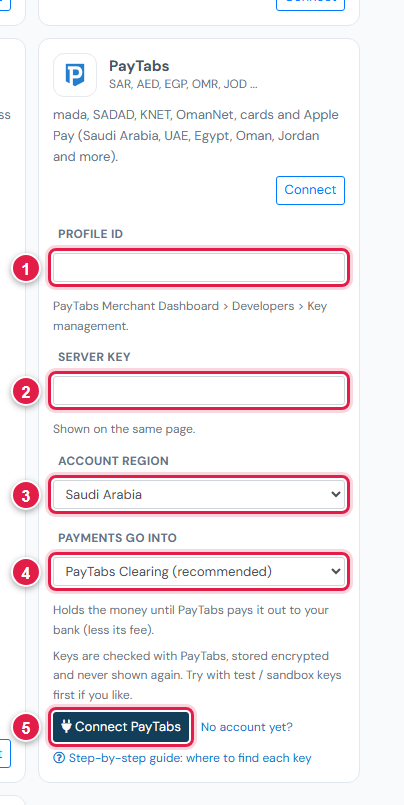
| # | Field | What to enter |
|---|---|---|
| 1 | Profile ID | Numbers only |
| 2 | Server Key | From Key management |
| 3 | Account region | The region of your dashboard (table above) |
| 4 | Payments go into | Keep PayTabs Clearing (recommended) |
| 5 | Connect PayTabs | Click it |
Step 3: Try a test payment
- Connect your test profile's keys first.
- Open a small invoice's Pay now link, choose PayTabs, and pay with a test card from Developers › Testing › Test Cards in your dashboard (for example
4111 1111 1111 1111, CVV123). - Check the invoice shows Paid, then cancel the test receipt.
Step 4: Go live
In Ellibo, click Keys, paste the live profile's Profile ID and Server Key, and Save.
Fees, payouts and refunds
- PayTabs pays out according to your agreement. Record payouts in Accounting › Online Payments.
- Refund with the Refund button in Ellibo.
If something goes wrong
| Problem | Fix |
|---|---|
| No merchant information found | The Account region is wrong. Choose the region of the dashboard you sign in to. |
| Keys not accepted | Copy the Server Key again from Key management, for the same profile as the Profile ID. |
See also Fix payment problems.