
API and webhooks
The Ellibo Books API for developers - API keys, the base address, every resource, list filters, creating customers, items, invoices and payments, errors and limits - plus where to find each app's own API.
The Ellibo Books API reads and writes your Accounting and Inventory data: customers, vendors, items and stock, invoices, bills, credit notes, estimates, orders and payments. It's a plain REST API that answers JSON. It works on every plan.
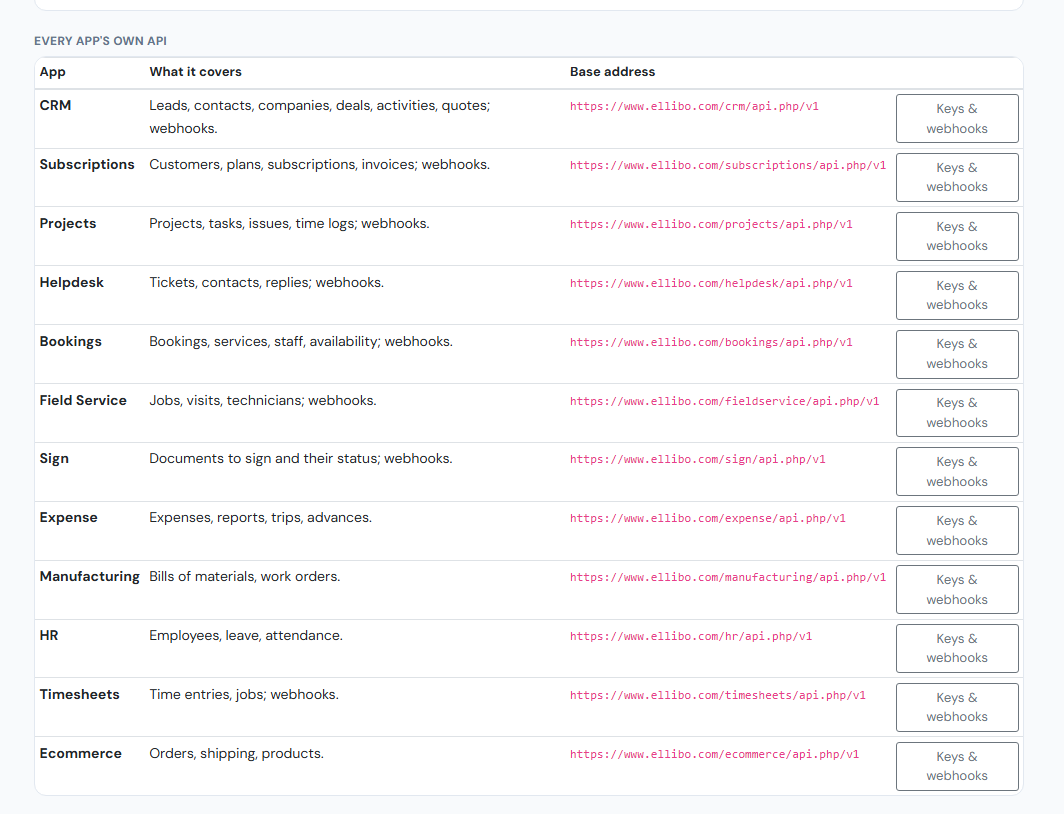
Other Ellibo apps - CRM, Subscriptions, Projects, Helpdesk, Bookings, Field Service, Sign, Expense, Manufacturing, HR, Timesheets and Ecommerce - have their own APIs. They're all listed under Every app's own API at the bottom of the API & webhooks tab:
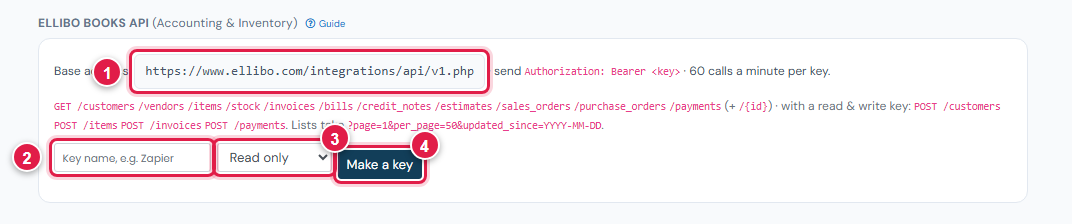
API keys
- Open Settings › Integrations › API & webhooks.
- Under Ellibo Books API, type a name (2) for the key, such as the app that will use it.
- Choose Read only or Read & write (3).
- Click Make a key (4). Copy the key now - it is shown only once.
| Key starts with | Can do |
|---|---|
ellb_ro_ | Read (GET) |
ellb_rw_ | Read and create (GET and POST) |
- A business can have 20 active keys. Revoke a key to stop it at once.
- The list shows when each key was last used.
- Keep keys secret: use them only on a server, never in a web page or a mobile app.
Making a call
- Base address (1):
https://www.ellibo.com/integrations/api/v1.php - Authentication:
Authorization: Bearer <your key>(orX-Api-Key: <your key>) - Limit: 60 calls a minute per key. Above that you get
429. - Dates are
YYYY-MM-DD. Times are UTC, like2026-11-09T10:15:00Z.
curl https://www.ellibo.com/integrations/api/v1.php/invoices?status=unpaid \
  -H "Authorization: Bearer ellb_ro_xxxxxxxx"
Reading (GET)
| Resource | What it lists |
|---|---|
/customers, /vendors | Parties with contact details, tax ID and address |
/items | Items and services, with price, tax rate and stock |
/stock | Only stock-tracked items: SKU and quantity on hand |
/invoices, /credit_notes, /estimates, /sales_orders | Sales documents |
/bills, /purchase_orders | Purchase documents |
/payments | Payments in and out |
Add /{id} for one record, for example /invoices/1042. One invoice includes its lines and its pay_link (the customer's Pay now page).
List filters:
| Parameter | Use |
|---|---|
page, per_page | Paging; per_page up to 100 (default 50). The answer says has_more |
updated_since | Only records changed since a date or time - good for syncing |
q | Search by name, email, phone (parties) or name, SKU, barcode (items) |
status | Documents: unpaid, paid, partial or cancelled |
customer_id, vendor_id | Documents of one party |
from, to | Documents by date |
direction | Payments: in or out |
A list answer looks like:
{"data": [ {...}, {...} ], "page": 1, "per_page": 50, "has_more": false}Creating (POST, read & write key)
Send JSON with Content-Type: application/json. A new record answers 201 with the record.
POST /customers (or /vendors) - name is required:
{"name": "Green Leaf Restaurant", "email": "accounts@greenleaf.example", "mobile": "+1 555 0100",
 "tax_id": "", "billing_address": "12 Main St", "city": "Denver", "state": "Colorado",
 "postal_code": "80202", "country": "United States", "external_ref": "crm-1882"}
POST /items - name is required; sku must be unique:
{"name": "Coffee beans 1 kg", "type": "goods", "sku": "CB-1KG", "sale_price": 18.50,
 "purchase_price": 11.00, "tax_rate": 5, "unit": "PCS", "track_stock": true}
POST /invoices - a sales invoice for one of your customers:
{"customer_id": 311, "date": "2026-11-09", "due_date": "2026-11-23", "reference": "PO-5521",
 "notes": "Thank you!", "external_ref": "shop-order-1001",
 "lines": [
   {"item_id": 57, "qty": 2},
   {"name": "Delivery", "qty": 1, "rate": 5.00, "tax_rate": 0},
   {"name": "Gift box", "qty": 1, "rate": 11.80, "tax_rate": 18, "rate_includes_tax": true, "discount": 1.00}
]}- 1 to 200 lines. A line with
item_iduses the item's name, price and tax unless you send them. rate_includes_tax: truemeans the rate already includes tax.is_igst:truefor IGST,falsefor CGST + SGST. Leave it out and Ellibo decides from the customer's state.- The answer includes the invoice's
number, totals andpay_link.
POST /payments - money received against an invoice:
{"invoice_id": 1042, "amount": 41.80, "date": "2026-11-10", "mode": "Bank transfer",
 "reference": "TRX-88231", "account_id": 12}
account_id is the bank or cash account it went into (your first bank account if left out).
Errors
Errors answer with a status code and:
{"error": {"code": "invalid", "message": "customer_id must be one of your customers.", "field": "customer_id"}}| Status | Code | Meaning |
|---|---|---|
| 400 | bad_request | A filter is malformed, e.g. updated_since |
| 401 | unauthorized | No key, a wrong key, or a revoked key |
| 403 | forbidden / read_only / plan_limit | Read-only key, the business is read-only (plan ended), or your plan's invoice limit is reached |
| 404 | not_found | No such record or resource |
| 409 | duplicate | An item with that SKU already exists |
| 422 | invalid | A field is missing or wrong - see field |
| 429 | rate_limited | More than 60 calls a minute |
Webhooks
To hear about changes instead of asking repeatedly, add a webhook. See Webhooks.
Every app's own API
Each app's address and keys are on its own settings page (the Keys & webhooks button). For example:
- CRM: leads, contacts, companies, deals, activities and quotes - see CRM API.
- Subscriptions: customers, plans, subscriptions and invoices - see Subscriptions API.
- Projects: projects, tasks, issues and time logs - see Projects API.