
Connect CCAvenue
Take cards, net banking, UPI, wallets and EMI - in rupees and many other currencies - through your own CCAvenue account. Includes the website registration CCAvenue needs first.
CCAvenue lets customers pay by cards, net banking, UPI, wallets and EMI, and it can take many currencies - useful when you invoice customers abroad. Customers are taken to CCAvenue's secure page. CCAvenue sends the result back when the customer returns, so no webhook is needed.
Before you start
- A CCAvenue merchant account with KYC done, and a live website with your policies (CCAvenue asks for one).
Register Ellibo's address with CCAvenue. CCAvenue only accepts payments that come from a website registered on your account. Ellibo sends your customers to CCAvenue from www.ellibo.com, so:
- Write to CCAvenue support (or your account manager): "Please register the website www.ellibo.com on my merchant account for payments."
- Wait for them to confirm. A new Access Code and Working Key then appear for that address.
- You must be an admin of the business in Ellibo.
If www.ellibo.com isn't registered, customers see Merchant Authentication failed (error 10002) on CCAvenue's page.
Step 1: Get your keys
- Sign in to the CCAvenue Dashboard.
- Go to Settings › API Keys.
- Copy your Merchant ID (at the top).
- In the list of websites, find www.ellibo.com and copy its Access Code and Working Key. Don't use the keys of another website.
Step 2: Connect in Ellibo
- Open Settings › Integrations › Payments.
- On the CCAvenue tile, click Connect.
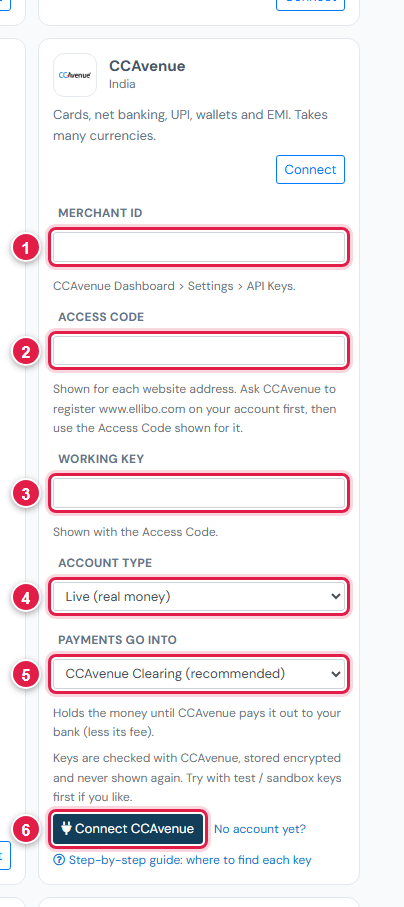
| # | Field | What to enter |
|---|---|---|
| 1 | Merchant ID | Numbers only |
| 2 | Access Code | The one shown for www.ellibo.com |
| 3 | Working Key | The one shown for www.ellibo.com |
| 4 | Account type | Live, or Test if CCAvenue gave you test access |
| 5 | Payments go into | Keep CCAvenue Clearing (recommended) |
| 6 | Connect CCAvenue | Click it |
Step 3: Try a payment
CCAvenue's test environment usually has to be switched on by CCAvenue for you. If you don't have it, make one small real payment (for example ₹10) to yourself and refund it with the Refund button.
- Open a small invoice's Pay now link and choose CCAvenue.
- Pay, and check the invoice shows Paid in Ellibo.
Other currencies
CCAvenue can take many currencies, but each must be switched on for your account. Ask CCAvenue which currencies you can accept. To offer CCAvenue only for some currencies, type them in Only these currencies on the Payments tab.
Fees, payouts and refunds
- Record CCAvenue's payouts in Accounting › Online Payments.
- Refund with the Refund button in Ellibo.
If something goes wrong
| Problem | Fix |
|---|---|
| Merchant Authentication failed / error 10002 | www.ellibo.com isn't registered, or you used the keys of another website. See Before you start. |
| Keys not accepted in Ellibo | The Working Key is 16-64 letters and numbers. Copy it again without spaces. |
| Customer paid but closed the page early | Click Check payment on the invoice. |
See also Fix payment problems.