
Connect Easebuzz
Take UPI, cards, net banking and wallets in rupees through your own Easebuzz account - Key and Salt, webhook, testing and going live.
Easebuzz lets customers pay in rupees by UPI, cards, net banking and wallets.
Before you start
- An Easebuzz account with KYC done. Sign up at easebuzz.in. Easebuzz sends your live Key and Salt after activation. Test (sandbox) keys may need to be requested from Easebuzz support.
- You must be an admin of the business in Ellibo.
Step 1: Get your Key and Salt
- Sign in to the Easebuzz Dashboard.
- Go to Settings › API Keys. (Easebuzz may also have emailed them to you as a Live Kit.)
- Copy the Merchant Key and the Salt.
Step 2: Connect in Ellibo
- Open Settings › Integrations › Payments.
- On the Easebuzz tile, click Connect.
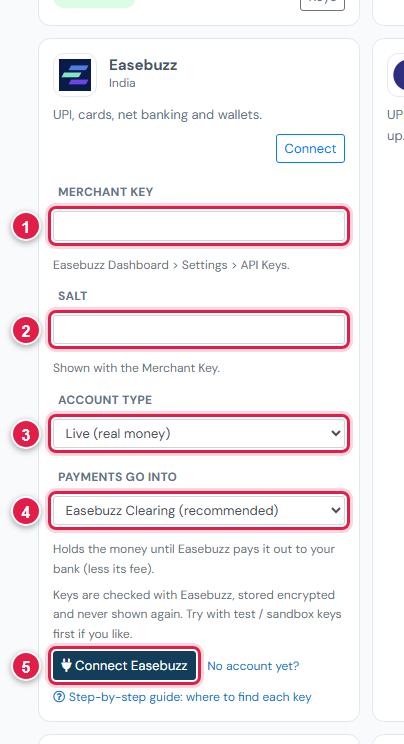
| # | Field | What to enter |
|---|---|---|
| 1 | Merchant Key | The Key |
| 2 | Salt | The Salt |
| 3 | Account type | Test / sandbox or Live |
| 4 | Payments go into | Keep Easebuzz Clearing (recommended) |
| 5 | Connect Easebuzz | Click it |
Step 3: Add the webhook
- In Ellibo, under Your gateways › Easebuzz, click Copy next to Webhook URL.
- In the Easebuzz Dashboard, open the webhook settings (Settings › Webhooks, or Payment Gateway › Account Settings › Webhooks).
- Paste the address for the Transaction webhook, save, and switch it on.
Step 4: Try a payment
- With test keys, open a small invoice's Pay now link, choose Easebuzz, and pay with the test details from Easebuzz support.
- Without test keys, pay a small real amount to yourself and refund it with the Refund button.
- Check the invoice shows Paid.
Fees, payouts and refunds
- Easebuzz usually pays out in two working days (T+2). Record payouts in Accounting › Online Payments.
- Refund with the Refund button in Ellibo.
- Easebuzz takes rupees only.
If something goes wrong
| Problem | Fix |
|---|---|
| Keys not accepted | Make sure Account type matches the keys (test or live). |
| Paid but not showing | Add the Transaction webhook. Click Check payment on the invoice. |
See also Fix payment problems.