
Connect Paytm
Take Paytm wallet, UPI, cards and net banking through your own Paytm Payments account - MID, Merchant Key, website name, testing and going live.
Paytm lets customers pay in rupees with the Paytm wallet, UPI, cards and net banking. Customers are taken to Paytm's secure page to pay. Paytm sends the result back when the customer returns, so no webhook is needed.
Before you start
- A Paytm Payments (Paytm for Business) account. Sign up at business.paytm.com. Test keys are ready straight away; the production MID comes after your account is activated and verified.
- You must be an admin of the business in Ellibo.
Step 1: Get your keys
- Sign in to the Paytm Payments dashboard.
- Go to Developer Settings › API Keys.
- Open the Test API Details tab (or Production API Details once activated). Click Generate now if there are no test keys yet.
- Copy the Merchant ID (MID) and the Merchant Key (16 characters).
- Note the Website name:
WEBSTAGINGfor test,DEFAULTfor live (unless Paytm gave you another).
Step 2: Connect in Ellibo
- Open Settings › Integrations › Payments.
- On the Paytm tile, click Connect.
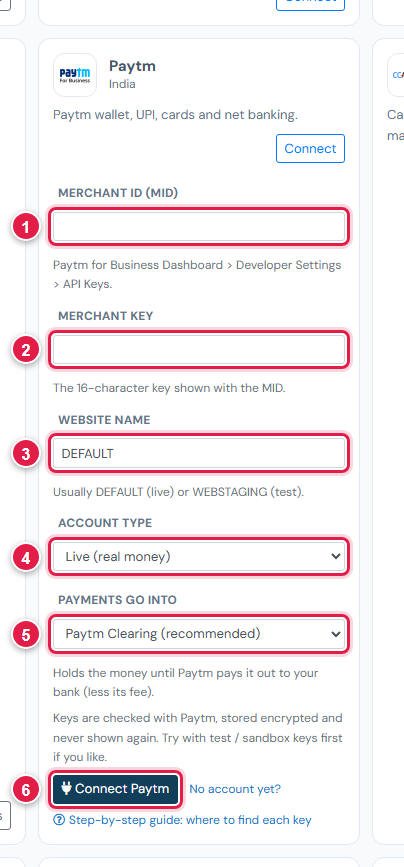
| # | Field | What to enter |
|---|---|---|
| 1 | Merchant ID (MID) | Your MID |
| 2 | Merchant Key | The 16-character key |
| 3 | Website name | WEBSTAGING (test) or DEFAULT (live) |
| 4 | Account type | Test / sandbox or Live |
| 5 | Payments go into | Keep Paytm Clearing (recommended) |
| 6 | Connect Paytm | Click it |
Step 3: Try a test payment
- Open a small invoice's Pay now link and choose Paytm.
- On Paytm's test page, pay with a test card (any Visa or Mastercard number from Paytm's test guide, CVV
123) or the test wallet (mobile7777777777, passwordPaytm12345, OTP489871). - Check the invoice shows Paid, then cancel the test receipt.
Step 4: Go live
- Once activated, copy the production MID and Merchant Key.
- In Ellibo, click Keys, paste them, set Website name to
DEFAULT, Account type to Live, and Save.
Fees, payouts and refunds
- Record Paytm's payouts in Accounting › Online Payments.
- Refund with the Refund button in Ellibo.
- Paytm takes rupees only.
If something goes wrong
| Problem | Fix |
|---|---|
| The 16-character key … | Copy the Merchant Key again; it's exactly 16 characters. |
| Paytm shows an error on its page | Website name doesn't match the keys. Use WEBSTAGING with test keys and DEFAULT with live keys. |
| Customer paid but closed the page early | Click Check payment on the invoice, or Check for new payments in Online Payments. The hourly check also finds it. |
See also Fix payment problems.