
Export to Tally
Give your accountant your ledgers and vouchers as Tally XML files - download them from Ellibo and import them in TallyPrime in two steps.
If your accountant uses TallyPrime (or Tally.ERP 9), you can send them your books from Ellibo as two XML files they import in a few clicks:
- Ledgers (masters) - customers, vendors, bank accounts, sales, purchase and GST ledgers.
- Vouchers - sales, credit notes, purchases, receipts and payments for the dates you choose.
There's nothing to connect: it's a download.
Step 1: Download the files
- Open Settings › Integrations › Connected apps.
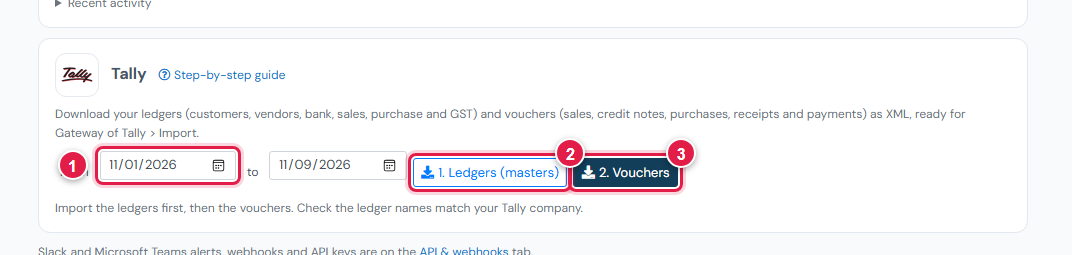
- On Tally, choose the dates From and to (1). For a month, for example 1st to last day of the month.
- Click 1. Ledgers (masters) (2). A file ellibo-tally-1-masters.xml downloads.
- Click 2. Vouchers (3). A file ellibo-tally-2-vouchers-…xml downloads.
Send both files to your accountant, or import them yourself.
Step 2: Import in TallyPrime
Take a backup of the Tally company first.
- Open the right company in TallyPrime.
- From Gateway of Tally, press Alt+O (Import) › Masters.
- File format: XML. File path / File to import: choose ellibo-tally-1-masters.xml.
- Import behaviour: choose Ignore duplicates - existing ledgers are kept, new ones are added. (Choose Modify with new data only if you want Ellibo's details to overwrite them.)
- Press Enter to import.
- Then press Alt+O › Transactions, choose ellibo-tally-2-vouchers-…xml, and import.
Always import the masters first: vouchers need their ledgers to exist.
Check the ledger names
Tally matches ledgers by name. If your Tally company already has a ledger called, say, HDFC Bank A/c and Ellibo calls it HDFC Bank, Tally creates a second ledger. Before the first import, either rename the accounts in Ellibo to match Tally, or ask your accountant to merge them after.
Each month
Download the vouchers for just that month and import them. Download the masters again when you've added new customers, vendors or accounts - with Ignore duplicates, importing them again is safe.
If something goes wrong
| Problem | Fix |
|---|---|
| Tally says a ledger doesn't exist | Import the masters file first, then the vouchers. |
| Vouchers came in twice | You imported the same dates twice. Delete the duplicates in Tally, and import each period once. |
| Totals differ from Ellibo | Check the ledger names match, and that the GST ledgers weren't renamed in Tally. |
| Tally shows an error line number | Send the file and the message to support. |