
Connect Razorpay
Take UPI, cards, net banking, wallets and EMI through your own Razorpay account - step by step, from API keys and the webhook to a test payment and going live.
Razorpay lets customers pay by UPI, cards, net banking, wallets and EMI, and it also takes international cards. It works for invoices from every Ellibo app, POS bills, bookings, and subscriptions - including automatic payments (cards, UPI Autopay and e-mandates).
Before you start
- A Razorpay account. Sign up at razorpay.com. Test mode works straight away; Live mode needs your KYC (PAN, business proof, bank account) and your website or app details, which Razorpay checks, usually within a few working days.
- You must be an admin of the business in Ellibo.
Step 1: Get your API keys
- Sign in to the Razorpay Dashboard.
- At the top, choose Test Mode (to try first) or Live Mode.
- Go to Account & Settings › API Keys (under Website and app settings).
- Click Generate Key (or Regenerate).
- Copy the Key Id (starts with
rzp_test_orrzp_live_) and the Key Secret.
Copy it or download it before you close the window. If you lose it, regenerate the key - the old one stops working.
Step 2: Connect in Ellibo
- Open Settings › Integrations › Payments.
- On the Razorpay tile, click Connect.
- Fill in the form:
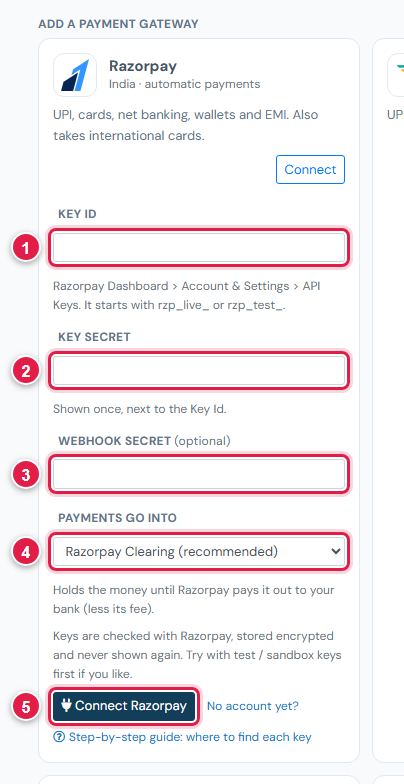
| # | Field | What to enter |
|---|---|---|
| 1 | Key Id | rzp_test_… or rzp_live_… |
| 2 | Key Secret | The secret shown with it |
| 3 | Webhook secret (optional) | Leave blank now - you add it in step 3 |
| 4 | Payments go into | Keep Razorpay Clearing (recommended) |
| 5 | Connect Razorpay | Click it |
Ellibo checks the keys with Razorpay. You see Razorpay is connected - with in TEST mode when you used test keys.
Step 3: Add the webhook
The webhook tells Ellibo the moment a customer pays.
- In Ellibo, under Your gateways › Razorpay, click Copy next to Webhook URL.
- In the Razorpay Dashboard (same mode as your keys), go to Account & Settings › Webhooks › + Add New Webhook.
- Webhook URL: paste the address.
- Secret: type a password of your own (not your API Key Secret). Write it down.
- Active Events: tick
payment_link.paid,payment.capturedandpayment.failed. - Click Create Webhook.
- Back in Ellibo, click Keys on Razorpay, paste the same secret into Webhook secret, and click Save. The webhook now shows Secret saved.
Step 4: Try a test payment
- Make a small invoice for yourself and open its Pay now link.
Choose Razorpay and pay with one of Razorpay's test details:
- UPI:
success@razorpay(orfailure@razorpayto try a failed payment); - Card:
4100 2800 0000 1007(Visa), any future date, any CVV, and any 4-10 digit OTP.
- UPI:
- The invoice shows Paid in Ellibo within seconds.
- Cancel the test receipt in Accounting afterwards.
Step 5: Go live
- Finish activation in Razorpay until your account shows as activated.
- Switch the dashboard to Live Mode and generate live API keys.
- In Ellibo, click Keys on Razorpay, paste the live Key Id and Key Secret, and Save.
- Add the webhook again in Live Mode (webhooks are separate for test and live), and paste its secret.
Fees, payouts and refunds
- Razorpay charges a fee per payment; see their pricing page. Ellibo adds nothing.
- Payouts reach your bank on Razorpay's schedule, usually two working days after payment (T+2). Record them in Accounting › Online Payments - see Payouts and refunds.
- Refund from Ellibo with the Refund button; the money goes back through Razorpay.
- Subscriptions can charge customers automatically through Razorpay - see Automatic payments.
If something goes wrong
| Problem | Fix |
|---|---|
| Razorpay did not accept this key | Copy both keys again, from the same mode. A test Key Id with a live secret won't work. |
| Payment made, invoice still unpaid | Check the webhook is added in the same mode as your keys, with the right secret. Then click Check payment on the invoice. |
| Webhook error in the Payment log | The webhook secret in Ellibo doesn't match the one in Razorpay. Paste it again. |
| International cards declined | Ask Razorpay to enable international payments on your account. |
See also Fix payment problems.