
Webhooks
Get told when something happens in Ellibo - the events, what each delivery contains, how to check the X-Ellibo-Signature, retries, and testing.
A webhook sends a message to a web address of yours when something happens in Ellibo: a new invoice, a payment received, a new order, booking, ticket, lead and more. Use it with Zapier, Make or n8n, or your own system.
Add a webhook
- Open Settings › Integrations › API & webhooks.
- Under Webhooks, click Add a webhook.
- Paste your address (1). It must start with
https://and be reachable from the internet. - Tick the events to send (2), and click Add webhook (3).
- Copy the signing secret Ellibo shows. It's shown only once.
- Click Send test (4). Ellibo sends a test delivery and shows what your address answered.
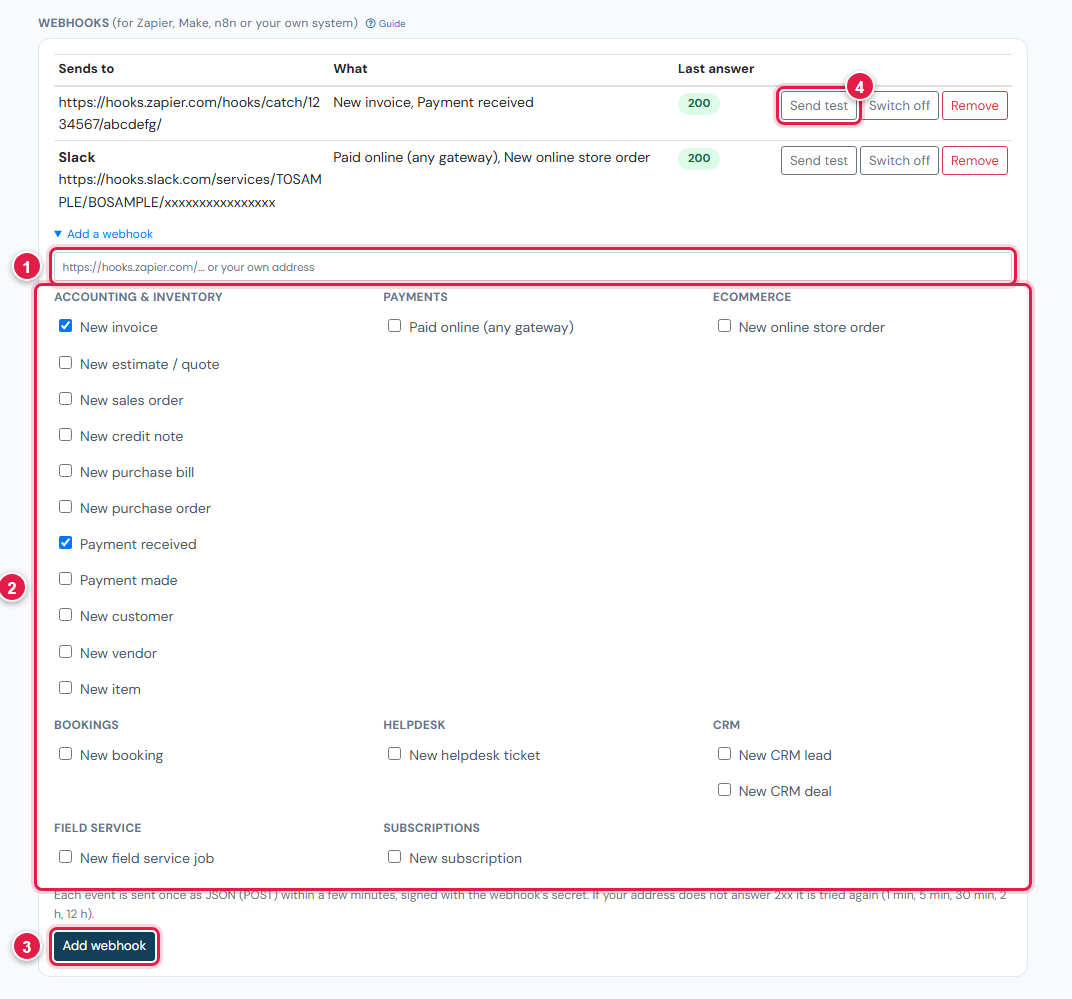
A business can have up to 20 webhooks (including Slack and Teams channels).
Events
| Event | When |
|---|---|
invoice.created | A sales invoice is saved |
estimate.created | An estimate or quote is saved |
sales_order.created | A sales order is saved |
credit_note.created | A credit note is saved |
bill.created | A purchase bill is saved |
purchase_order.created | A purchase order is saved |
payment.received | A payment in is recorded |
payment.made | A payment out is recorded |
customer.created / vendor.created | A customer or vendor is added |
item.created | An item is added |
online_payment.paid | A customer paid online through any gateway |
order.created | A new Ecommerce store order |
booking.created | A new booking |
ticket.created | A new Helpdesk ticket |
lead.created / deal.created | A new CRM lead or deal |
job.created | A new Field Service job |
subscription.created | A new subscription |
Only things that happen after you add the webhook are sent - never older records.
What a delivery looks like
Each event is one POST with a JSON body:
POST https://your-address
Content-Type: application/json
User-Agent: Ellibo-Webhooks/1.0
X-Ellibo-Event: invoice.created
X-Ellibo-Delivery: 58213
X-Ellibo-Signature: sha256=5b1f0c...e9

{
  "event": "invoice.created",
  "business_id": 200294,
  "delivery_id": 58213,
  "sent_at": "2026-11-09T10:15:04+00:00",
  "summary": "New invoice INV-0042 for Green Leaf Restaurant: USD 41.80",
  "data": { "voucher_id": 1042, "voucher_no": "INV-0042", "party_name": "Green Leaf Restaurant", "total_amt": 41.8, ... }
}summaryis a ready-made sentence, handy for chat messages and emails.dataholds the record's fields as stored (secrets are never included). Use its id with the API to read the full record.delivery_idis unique. If you ever receive the same id twice, ignore the second.
Timing and retries
- Ellibo looks for new events every few minutes, so a delivery usually arrives within five minutes.
- Answer with any 2xx status quickly (within 15 seconds). Do the slow work afterwards.
- If your address doesn't answer 2xx, Ellibo tries again after 1 minute, 5 minutes, 30 minutes, 2 hours and 12 hours.
- After 20 failures in a row, the webhook is switched off. Fix your address and click Switch on. Events that happened while it was off are not sent.
Check the signature
Each delivery is signed with the webhook's secret: X-Ellibo-Signature: sha256= followed by the HMAC-SHA256 of the raw body, in hex. Check it so nobody else can pretend to be Ellibo.
PHP
$body = file_get_contents('php://input');
$expected = 'sha256=' . hash_hmac('sha256', $body, 'whsec_your_secret');
if (!hash_equals($expected, $_SERVER['HTTP_X_ELLIBO_SIGNATURE'] ?? '')) { http_response_code(401); exit; }
$event = json_decode($body, true);
Node.js (Express)
app.post('/ellibo', express.raw({type: 'application/json'}), (req, res) => {
  const expected = 'sha256=' + crypto.createHmac('sha256', 'whsec_your_secret').update(req.body).digest('hex');
  const got = req.get('X-Ellibo-Signature') || '';
  if (got.length !== expected.length || !crypto.timingSafeEqual(Buffer.from(got), Buffer.from(expected))) return res.sendStatus(401);
  const event = JSON.parse(req.body);
  res.sendStatus(200);
});
Python (Flask)
body = request.get_data()
expected = 'sha256=' + hmac.new(b'whsec_your_secret', body, hashlib.sha256).hexdigest()
if not hmac.compare_digest(expected, request.headers.get('X-Ellibo-Signature', '')):
    abort(401)
event = json.loads(body)
Always use the raw body - not JSON you parsed and encoded again.
Manage webhooks
The list shows each address, its events and its last answer (green for 2xx, red otherwise, with the number of failures in a row).
- Send test - sends a test delivery now.
- Switch off / Switch on - pause and resume. Switching on starts from that moment.
- Remove - deletes it.
To change events or the address, remove the webhook and add a new one.
If something goes wrong
| Problem | Fix |
|---|---|
| Enter a web address that starts with https:// | Webhooks only go to HTTPS addresses. |
| This address cannot be reached from the internet | Local addresses (localhost, 192.168.x.x) don't work. Use a public address, or a tunnel while developing. |
| Signature doesn't match | Use the raw body and the secret of this webhook (each has its own). |
| Nothing arrives | Check the webhook is on, that the events happened after you added it, and wait five minutes. |